
ContX IQ: Complete CRUD Workflow with _Application as Subject
This comprehensive example demonstrates a full CRUD workflow:
Phase 1 - Initial Read:
- Application reads all Car nodes (allowed by unrestricted policy)
Phase 2 - Create Relationship:
- Application creates USES relationship to a specific Car
- Graph: _Application -[USES]-> Car1
Phase 3 - Read with Relationship Filter:
- New policy restricts reads to Cars the Application USES
- Only Car1 is returned (not all cars)
Phase 4 - Create New Node:
- Application creates a new Car node
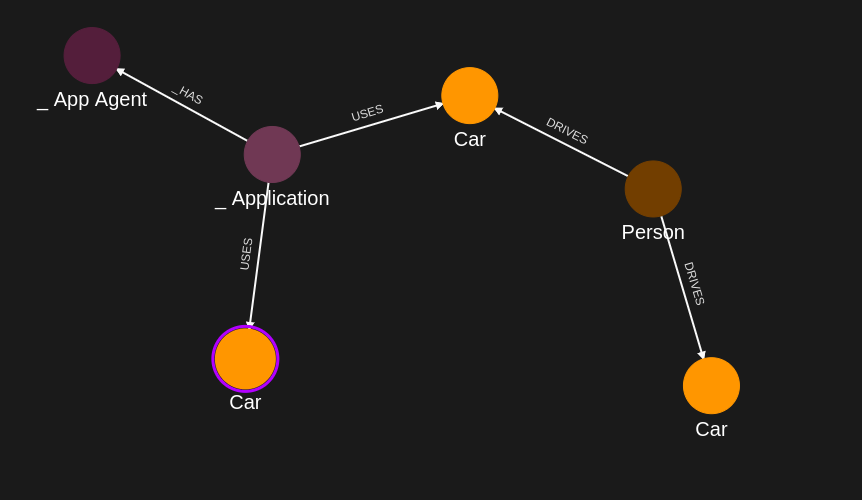
- Graph: _Application -[USES]-> Car1, _Application -[USES]-> NewCar
Key concept: As relationships are added, authorization scope changes dynamically.
Use case
Scenario: A fleet management application that gradually acquires access to vehicles.
Workflow demonstration:
1. Application starts with no vehicle relationships
2. Application reads available vehicles (broad access)
3. Application "claims" Car1 by creating USES relationship
4. Future reads are scoped to claimed vehicles only
5. Application can add new vehicles to its fleet
Graph evolution:
Initial: _Application (no connections to data)
After Step 6: _Application -[USES]-> Car1
After Step 12: _Application -[USES]-> Car1, _Application -[USES]-> NewCar
This pattern is common for:
- Multi-tenant applications
- Resource provisioning systems
- Dynamic access control scenarios
Requirements
Prerequisites:
- ServiceAccount credentials: For creating policies and queries (Bearer token)
- AppAgent credentials: For data ingestion and query execution (X-IK-ClientKey)
Required API access:
- POST /capture/v1/nodes/ and /capture/v1/relationships/ (initial data)
- POST /configs/v1/authorization-policies (multiple policies for different phases)
- POST /configs/v1/knowledge-queries (read and write queries)
- POST /contx-iq/v1/execute (run queries)
Steps
Step 1: Ingest Initial Car Data
- Authentication: AppAgent credential (X-IK-ClientKey header)
- Action: POST Car nodes (Car1, Car2, Car3) and Person nodes
- Result: Graph with vehicles ready for Application to interact with
Step 2: Create Initial Read/Write Policy
- Authentication: ServiceAccount credential (Bearer token)
- Action: POST policy allowing:
- READ on Car nodes (filtered by $carId parameter)
- UPSERT on USES relationships (Application -> Car)
- Result: Policy ID returned
Step 3: Create Read Query
- Authentication: ServiceAccount credential (Bearer token)
- Action: POST query that reads Car node properties
- Input parameter: $carId (optional, to filter specific car)
- Result: Query ID returned
Step 4: Execute Read Query
- Authentication: AppAgent credential (X-IK-ClientKey header)
- Action: Run query to read Car1
- Result: Car1 properties returned
Step 5: Create Relationship Upsert Query
- Authentication: ServiceAccount credential (Bearer token)
- Action: POST query that creates _Application -[USES]-> Car relationship
- Result: Query ID returned
Step 6: Execute Relationship Creation
- Authentication: AppAgent credential (X-IK-ClientKey header)
- Action: Run query to create USES relationship to Car1
- Result: _Application now connected to Car1
Step 7: Create Relationship-Scoped Policy
- Authentication: ServiceAccount credential (Bearer token)
- Action: POST policy that only allows READ on Cars the Application USES
- This demonstrates progressive authorization based on relationships
- Result: Policy ID returned
Step 8: Create Scoped Read Query
- Authentication: ServiceAccount credential (Bearer token)
- Action: POST query that reads Cars connected to Application via USES
- Result: Query ID returned
Step 9: Execute Scoped Read
- Authentication: AppAgent credential (X-IK-ClientKey header)
- Action: Run query
- Result: Only Car1 returned (the one with USES relationship)
Step 10: Create Node Creation Policy
- Authentication: ServiceAccount credential (Bearer token)
- Action: POST policy allowing creation of new Car nodes
- Result: Policy ID returned
Step 11: Create Node Creation Query
- Authentication: ServiceAccount credential (Bearer token)
- Action: POST query that creates new Car node and USES relationship
- Parameters: $newCarId, $newCarName
- Result: Query ID returned
Step 12: Execute Node Creation
- Authentication: AppAgent credential (X-IK-ClientKey header)
- Action: Run query with new car parameters
- Result: New Car node created and linked to Application
Step 1
Capture the nodes needed for this use case.
{
  "nodes": [
    {
      "external_id": "alice",
      "is_identity": true,
      "type": "Person",
      "properties": [
        {
          "type": "email",
          "value": "alice@email.com"
        },
        {
          "type": "given_name",
          "value": "Alice"
        },
        {
          "type": "last_name",
          "value": "Smith"
        }
      ]
    },
    {
      "external_id": "knightrider",
      "type": "Person",
      "is_identity": true,
      "properties": [
        {
          "type": "email",
          "value": "knightrider@demo.com"
        },
        {
          "type": "name",
          "value": "Michael Knight"
        }
      ]
    },
    {
      "external_id": "satchmo",
      "type": "Person",
      "is_identity": true,
      "properties": [
        {
          "type": "email",
          "value": "satchmo@demo.com"
        },
        {
          "type": "name",
          "value": "Louis Armstrong"
        }
      ]
    },
    {
      "external_id": "karel",
      "type": "Person",
      "is_identity": true,
      "properties": [
        {
          "type": "email",
          "value": "karel@demo.com"
        },
        {
          "type": "name",
          "value": "Karel Plihal"
        }
      ]
    },
    {
      "external_id": "kitt",
      "type": "Car",
      "is_identity": false,
      "properties": [
        {
          "type": "manufacturer",
          "value": "pontiac"
        },
        {
          "type": "model",
          "value": "Firebird"
        }
      ]
    },
    {
      "external_id": "cadillacv16",
      "type": "Car",
      "is_identity": false,
      "properties": [
        {
          "type": "manufacturer",
          "value": "Cadillac"
        },
        {
          "type": "model",
          "value": "V-16"
        }
      ]
    },
    {
      "external_id": "harmonika",
      "type": "Bus",
      "is_identity": false,
      "properties": [
        {
          "type": "manufacturer",
          "value": "Ikarus"
        },
        {
          "type": "model",
          "value": "280"
        }
      ]
    },
    {
      "external_id": "listek",
      "type": "Ticket",
      "is_identity": false
    },
    {
      "external_id": "airbook-xyz",
      "type": "Laptop",
      "is_identity": false
    }
  ]
}
Capture the relationships needed for this use case.
{
  "relationships": [
    {
      "source": {
        "external_id": "knightrider",
        "type": "Person"
      },
      "target": {
        "external_id": "kitt",
        "type": "Car"
      },
      "type": "DRIVES"
    },
    {
      "source": {
        "external_id": "satchmo",
        "type": "Person"
      },
      "target": {
        "external_id": "cadillacv16",
        "type": "Car"
      },
      "type": "DRIVES"
    },
    {
      "source": {
        "external_id": "karel",
        "type": "Person"
      },
      "target": {
        "external_id": "listek",
        "type": "Ticket"
      },
      "type": "HAS"
    },
    {
      "source": {
        "external_id": "listek",
        "type": "Ticket"
      },
      "target": {
        "external_id": "harmonika",
        "type": "Bus"
      },
      "type": "FOR"
    },
    {
      "source": {
        "external_id": "karel",
        "type": "Person"
      },
      "target": {
        "external_id": "airbook-xyz",
        "type": "Laptop"
      },
      "type": "OWNS"
    },
    {
      "source": {
        "external_id": "alice",
        "type": "Person"
      },
      "target": {
        "external_id": "airbook-xyz",
        "type": "Laptop"
      },
      "type": "OWNS"
    },
    {
      "source": {
        "external_id": "knightrider",
        "type": "Person"
      },
      "target": {
        "external_id": "kitt",
        "type": "Car"
      },
      "type": "OWNS"
    },
    {
      "source": {
        "external_id": "alice",
        "type": "Person"
      },
      "target": {
        "external_id": "cadillacv16",
        "type": "Car"
      },
      "type": "DRIVES"
    }
  ]
}
Step 2
Create a CIQ Policy which designates the nodes which are allowed to be read and the nodes which are allowed to be upserted.
The policy filters first on subject.external_id.
When the subject is _Application, the $_appId input does not need to be provided and is automatically assigned the subject.external_id value.
The policy also filters on car.external_id. The $carId input will need to be provided in the CIQ Execution.
The policy allows the Car nodes to be read, existing Car nodes to be upserted and new relationships between the subject and Car nodes to be upserted
{
  "meta": {
    "policy_version": "1.0-ciq"
  },
  "subject": {
    "type": "_Application"
  },
  "condition": {
    "cypher": "MATCH (subject:_Application) MATCH (car:Car)",
    "filter": [
      {
        "operator": "AND",
        "operands": [
          {
            "operator": "=",
            "attribute": "subject.external_id",
            "value": "$_appId",
            "advice": {
              "error_description": "subject external_id filter error"
            }
          },
          {
            "operator": "=",
            "attribute": "car.external_id",
            "value": "$carId"
          }
        ]
      }
    ]
  },
  "allowed_reads": {
    "nodes": [
      "car",
      "car.*"
    ]
  },
  "allowed_upserts": {
    "nodes": {
      "existing_nodes": [
        "car"
      ]
    },
    "relationships": {
      "relationship_types": [
        {
          "type": "USES",
          "source_node_label": "_Application",
          "target_node_label": "Car"
        }
      ]
    }
  }
}
Json to create the CIQ Policy configuration using REST.
{
  "project_id": "your_project_gid",
  "description": "description of policy",
  "display_name": "policy name",
  "name": "policy-name",
  "policy": "{\"meta\":{\"policy_version\":\"1.0-ciq\"},\"subject\":{\"type\":\"_Application\"},\"condition\":{\"cypher\":\"MATCH (subject:_Application) MATCH (car:Car)\",\"filter\":[{\"operator\":\"AND\",\"operands\":[{\"operator\":\"=\",\"attribute\":\"subject.external_id\",\"value\":\"$_appId\",\"advice\":{\"error_description\":\"subject external_id filter error\"}},{\"operator\":\"=\",\"attribute\":\"car.external_id\",\"value\":\"$carId\"}]}]},\"allowed_reads\":{\"nodes\":[\"car\",\"car.*\"]},\"allowed_upserts\":{\"nodes\":{\"existing_nodes\":[\"car\"]},\"relationships\":{\"relationship_types\":[{\"type\":\"USES\",\"source_node_label\":\"_Application\",\"target_node_label\":\"Car\"}]}}}",
  "status": "ACTIVE",
  "tags": []
}
Json to read the CIQ Policy configuration using REST.
{
  "id": "your_policy_configuration_gid"
}
Step 3
The CIQ Query designates the Car nodes to be read.
{
  "nodes": [
    "car.external_id",
    "car.property.model"
  ],
  "relationships": []
}
Json to create a CIQ Query configuration using REST.
{
  "project_id": "your_project_gid",
  "description": "description of knowledge query",
  "display_name": "knowledge query name",
  "name": "knowledge-query-name",
  "policy_id": "your_policy_gid",
  "query": "{\"nodes\":[\"car.external_id\",\"car.property.model\"],\"relationships\":[]}",
  "status": "ACTIVE"
}
Read the CIQ Query Configuration.
{
  "id": "your_knowledge_query_configuration_gid"
}
Step 4
Run a CIQ Execution to read a Car node.
{
  "id": "knowledge_query_gid",
  "input_params": {
    "carId": "cadillacv16"
  },
  "page_token": 1
}
CIQ Execution response.
{
  "data": [
    {
      "nodes": {
        "car.external_id": "cadillacv16",
        "car.property.model": "V-16"
      }
    }
  ]
}
Step 5
The CIQ Query designates the relationships USES to be upserted between the subject and a Car node.
{
  "nodes": [
    "car.external_id",
    "car.property.model"
  ],
  "relationships": [],
  "upsert_relationships": [
    {
      "name": "newRel",
      "source": "subject",
      "target": "car",
      "type": "USES",
      "properties": [
        {
          "type": "status",
          "value": "active"
        }
      ]
    }
  ]
}
Json to create a CIQ Query configuration using REST.
{
  "project_id": "your_project_gid",
  "description": "description of knowledge query",
  "display_name": "knowledge query name",
  "name": "knowledge-query-name",
  "policy_id": "your_policy_gid",
  "query": "{\"nodes\":[\"car.external_id\",\"car.property.model\"],\"relationships\":[],\"upsert_relationships\":[{\"name\":\"newRel\",\"source\":\"subject\",\"target\":\"car\",\"type\":\"USES\",\"properties\":[{\"type\":\"status\",\"value\":\"active\"}]}]}",
  "status": "ACTIVE"
}
Read the CIQ Query Configuration.
{
  "id": "your_knowledge_query_configuration_gid"
}
Step 6
Run a CIQ Execution to upsert one relationship USES between the subject and a Car node.
{
  "id": "knowledge_query_gid",
  "input_params": {
    "carId": "cadillacv16"
  },
  "page_token": 1
}
CIQ Execution response.
{
  "data": [
    {
      "nodes": {
        "car.external_id": "cadillacv16",
        "car.property.model": "V-16"
      }
    }
  ]
}
Step 7
Create a CIQ Policy which designates the nodes which are allowed to be read and the nodes which are allowed to be upserted, according to the graph created previously.
The policy filters first on subject.external_id.
When the subject is _Application, the $_appId input does not need to be provided and is automatically assigned the subject.external_id value.
The policy also filters on car.external_id. The $carId input will need to be provided in the CIQ Execution.
The policy allows the Car nodes to be read, existing Car nodes to be upserted and new relationships between the subject and Car nodes to be upserted
{
  "meta": {
    "policy_version": "1.0-ciq"
  },
  "subject": {
    "type": "_Application"
  },
  "condition": {
    "cypher": "MATCH (subject:_Application)-[:USES]->(car:Car)",
    "filter": [
      {
        "operator": "AND",
        "operands": [
          {
            "operator": "=",
            "attribute": "subject.external_id",
            "value": "$_appId",
            "advice": {
              "error_description": "subject external_id filter error"
            }
          },
          {
            "operator": "=",
            "attribute": "car.external_id",
            "value": "$carId"
          }
        ]
      }
    ]
  },
  "allowed_reads": {
    "nodes": [
      "car",
      "car.*"
    ]
  },
  "allowed_upserts": {
    "nodes": {
      "existing_nodes": [
        "car"
      ]
    },
    "relationships": {
      "relationship_types": [
        {
          "type": "USES",
          "source_node_label": "_Application",
          "target_node_label": "Car"
        }
      ]
    }
  }
}
Request to create the CIQ Policy configuration using REST.
{
  "project_id": "your_project_gid",
  "description": "description of policy",
  "display_name": "policy name",
  "name": "policy-name",
  "policy": "{\"meta\":{\"policy_version\":\"1.0-ciq\"},\"subject\":{\"type\":\"_Application\"},\"condition\":{\"cypher\":\"MATCH (subject:_Application)-[:USES]->(car:Car)\",\"filter\":[{\"operator\":\"AND\",\"operands\":[{\"operator\":\"=\",\"attribute\":\"subject.external_id\",\"value\":\"$_appId\",\"advice\":{\"error_description\":\"subject external_id filter error\"}},{\"operator\":\"=\",\"attribute\":\"car.external_id\",\"value\":\"$carId\"}]}]},\"allowed_reads\":{\"nodes\":[\"car\",\"car.*\"]},\"allowed_upserts\":{\"nodes\":{\"existing_nodes\":[\"car\"]},\"relationships\":{\"relationship_types\":[{\"type\":\"USES\",\"source_node_label\":\"_Application\",\"target_node_label\":\"Car\"}]}}}",
  "status": "ACTIVE",
  "tags": []
}
Request to read the CIQ Policy configuration using REST.
{
  "id": "your_policy_configuration_gid"
}
Step 8
The CIQ Query designates the Car nodes to be read.
{
  "nodes": [
    "car.external_id",
    "car.property.model"
  ],
  "relationships": []
}
Json to create a CIQ Query configuration using REST.
{
  "project_id": "your_project_gid",
  "description": "description of knowledge query",
  "display_name": "knowledge query name",
  "name": "knowledge-query-name",
  "policy_id": "your_policy_gid",
  "query": "{\"nodes\":[\"car.external_id\",\"car.property.model\"],\"relationships\":[]}",
  "status": "ACTIVE"
}
Read the CIQ Query Configuration.
{
  "id": "your_knowledge_query_configuration_gid"
}
Step 9
Run a CIQ Execution to read a Car node.
{
  "id": "knowledge_query_gid",
  "input_params": {
    "carId": "cadillacv16"
  },
  "page_token": 1
}
CIQ Execution response in json format.
{
  "data": [
    {
      "nodes": {
        "car.external_id": "cadillacv16",
        "car.property.model": "V-16"
      }
    }
  ]
}
Step 10
Create a CIQ Policy which designates only the subject _Application and then the Car nodes which are allowed to be upserted.
The policy only filters first on subject.external_id.
When the subject is _Application, the $_appId input does not need to be provided and is automatically assigned the subject.external_id value.
The policy allows the subject node to be read, new Car nodes to be upserted and new relationships between the subject and Car nodes to be upserted
{
  "meta": {
    "policy_version": "1.0-ciq"
  },
  "subject": {
    "type": "_Application"
  },
  "condition": {
    "cypher": "MATCH (subject:_Application)",
    "filter": [
      {
        "operator": "=",
        "attribute": "subject.external_id",
        "value": "$_appId"
      }
    ]
  },
  "allowed_reads": {
    "nodes": [
      "subject",
      "subject.*"
    ]
  },
  "allowed_upserts": {
    "nodes": {
      "node_types": [
        "Car"
      ]
    },
    "relationships": {
      "relationship_types": [
        {
          "type": "USES",
          "source_node_label": "_Application",
          "target_node_label": "Car"
        }
      ]
    }
  }
}
Json to create the CIQ Policy configuration using REST.
{
  "project_id": "your_project_gid",
  "description": "description of policy",
  "display_name": "policy name",
  "name": "policy-name",
  "policy": "{\"meta\":{\"policy_version\":\"1.0-ciq\"},\"subject\":{\"type\":\"_Application\"},\"condition\":{\"cypher\":\"MATCH (subject:_Application)\",\"filter\":[{\"operator\":\"=\",\"attribute\":\"subject.external_id\",\"value\":\"$_appId\"}]},\"allowed_reads\":{\"nodes\":[\"subject\",\"subject.*\"]},\"allowed_upserts\":{\"nodes\":{\"node_types\":[\"Car\"]},\"relationships\":{\"relationship_types\":[{\"type\":\"USES\",\"source_node_label\":\"_Application\",\"target_node_label\":\"Car\"}]}}}",
  "status": "ACTIVE",
  "tags": []
}
Json to read the CIQ Policy configuration using REST.
{
  "id": "your_policy_configuration_gid"
}
Step 11
The CIQ Query designates the Car nodes to be upserted.
{
  "nodes": [
    "car.external_id",
    "car.property.model"
  ],
  "relationships": [],
  "upsert_nodes": [
    {
      "name": "car",
      "type": "Car",
      "external_id": "$carExtId",
      "properties": [
        {
          "type": "model",
          "value": "$model"
        },
        {
          "type": "color",
          "value": "$color"
        }
      ]
    }
  ],
  "upsert_relationships": [
    {
      "name": "newRel",
      "source": "subject",
      "target": "car",
      "type": "USES",
      "properties": [
        {
          "type": "status",
          "value": "active"
        }
      ]
    }
  ]
}
Json to create a CIQ Query configuration using REST.
{
  "project_id": "your_project_gid",
  "description": "description of knowledge query",
  "display_name": "knowledge query name",
  "name": "knowledge-query-name",
  "policy_id": "your_policy_gid",
  "query": "{\"nodes\":[\"car.external_id\",\"car.property.model\"],\"relationships\":[],\"upsert_nodes\":[{\"name\":\"car\",\"type\":\"Car\",\"external_id\":\"$carExtId\",\"properties\":[{\"type\":\"model\",\"value\":\"$model\"},{\"type\":\"color\",\"value\":\"$color\"}]}],\"upsert_relationships\":[{\"name\":\"newRel\",\"source\":\"subject\",\"target\":\"car\",\"type\":\"USES\",\"properties\":[{\"type\":\"status\",\"value\":\"active\"}]}]}",
  "status": "ACTIVE"
}
Read the CIQ Query Configuration.
{
  "id": "your_knowledge_query_configuration_gid"
}
Step 12
Run a CIQ Execution to upsert a Car node.
{
  "id": "knowledge_query_gid",
  "input_params": {
    "carExtId": "LightningMcqueen",
    "model": "Corvette C6",
    "color": "red"
  },
  "page_token": 1
}
CIQ Execution response.
{
  "data": [
    {
      "nodes": {
        "car.external_id": "LightningMcqueen",
        "car.property.model": "Corvette C6"
      }
    }
  ]
}API Endpoints
/capture/v1/nodes/capture/v1/relationships/configs/v1/authorization-policies/configs/v1/knowledge-queries/contx-iq/v1/execute