
What is ContX IQ (CIQ)?
ContX IQ (Contextual Intelligence Query) is IndyKite's context-aware data retrieval and mutation system. It delivers the right data, at the right time, in the right context.
Why is CIQ context-aware?
- Query-time evaluation: Every query is evaluated against the current state of the graph.
- Caller context: Authorization considers the caller's identity, relationships, and parameters.
- Current state: Results reflect the graph as it exists at query time.
- External integration: Can fetch data from external APIs via External Data Resolver.
CIQ consists of three components:
- CIQ Policy: Defines what data can be accessed and what operations are allowed.
- CIQ Knowledge Query: Specifies what to do with the data (read, create, update, delete).
- CIQ Execution Query: Runs the knowledge query at runtime with specific parameters.
How do CIQ components work together?
Think of it this way:
- Policy = What's required (graph structure) + What's allowed (permissions)
- Knowledge Query = What to do (read/create/update/delete operations)
- Execution Query = Run it now with these parameter values
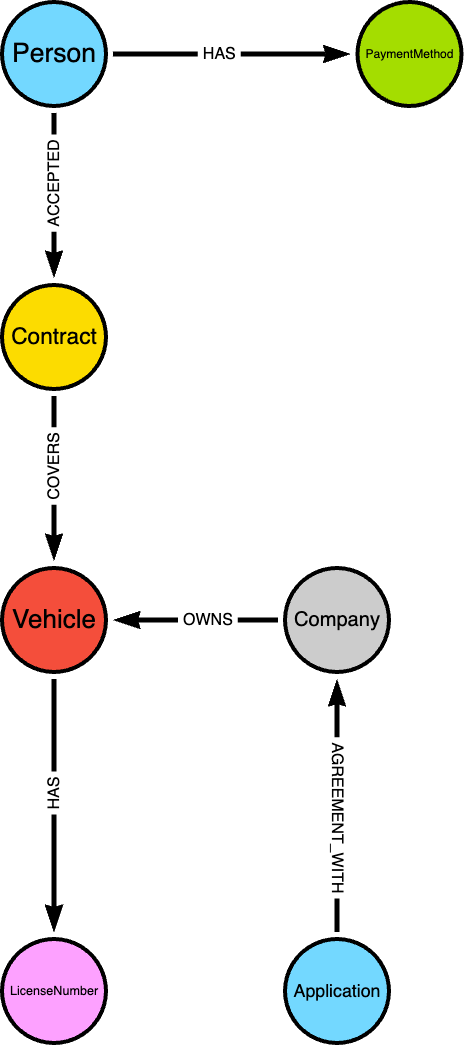
Schema example
What credentials do I need?
- Creating policies and knowledge queries: Service Account credentials (Config API)
- Executing queries: AppAgent credentials + optional user access token
Configuration methods:
- Terraform: indykite_authorization_policy and indykite_knowledge_query resources
- REST API: Config API documentation
CIQ Policy
What is a CIQ Policy?
A CIQ Policy defines the authorization rules for data access. An administrator selects:
- Nodes and relationships: The graph elements involved.
- Subject node: One node must be designated as the subject (the entity requesting access).
- Filters: Static or partial filters to constrain the data.
What are static vs partial filters?
- Static filter: Value is hardcoded in the policy.
Example:group.property.status = 'active' - Partial filter: Value is provided at execution time.
Example:user.property.email = $user_email
Can I have multiple subject types?
No. A policy is restricted to a single subject type. If you need two subjects (e.g., Person and _Application), create two separate policies.
What is the _Application subject?
When you create an Application with credentials, IndyKite creates _Application and _AppAgent nodes in the IKG. You can use _Application as an authenticated subject.
When the subject type is _Application, add a filter with:
attribute: subject.external_idvalue: $_appId(reserved value that matches the application's external_id)
CIQ Policy Syntax
{
	"meta": {
		"policy_version": "1.0-ciq"
	},
	"subject": {
		"type": "<string>"
	},
	"condition": {
		"cypher": "<string>",
		"filter": [{
			"operator": "<string>",
			"attribute": "<string>",
			"value": "<any>",
			"operands": [{
				"operator": "<string>",
				"attribute": "<string>",
				"value": "<any>",
				"operands": [{...}]
			}]
		}],
		"token_filter": {
			"operator": "<string>",
			"attribute": "<string>",
			"value": "<any>",
			"operands": [{
				"operator": "<string>",
				"attribute": "<string>",
				"value": "<any>",
				"operands": [{...}],
				"advice": {
					"error": "<string>",
					"error_description": "<string>"
				}
			}],
			"advice": {
				"error": "<string>",
				"error_description": "<string>"
			}
		}
	},
	"allowed_upserts": {
		"nodes": {
			"existing_nodes": ["<string>"],
			"node_types": ["<string>"]
		},
		"relationships": {
			"existing_relationships": ["<string>"],
			"relationship_types": [{
				"type": "<string>",
				"source_node_label": "<string>",
				"target_node_label": "<string>"
			}]
		}
	},
	"allowed_deletes": {
		"nodes": ["<string>"],
		"relationships": ["<string>"]
	},
	"allowed_reads": {
		"nodes": ["<string>"],
		"relationships": ["<string>"],
		"aggregate_values": ["<string>"]
	}
}
What does each field mean?
meta
policy_version: The policy syntax version. Current version is1.0-ciq.
subject
type: The node type for the subject (e.g.,Person,_Application).
condition
cypher: The Cypher query defining nodes and relationships. Supports:MATCH,OPTIONAL MATCH,WHERE,WITHclauses- Aggregate functions (e.g.,
COLLECT({username: usernameProp.value}) AS usernames) - Inline property filters (e.g.,
MATCH (user:User {id: 1234}))
filter
Array of filters for nodes and relationships. Each filter has:
operator: The comparison operator (see table below)attribute: The attribute to compare (omit for AND/OR/NOT)value: The comparison value (omit for AND/OR/NOT). Can be:- a hardcoded constant;
- a parameter or token reference with the
$prefix ($param,$token.<claim>,$_appId); - a reference to another matched attribute with the
@prefix (e.g.@venue.property.max_loudness) - this compares theattributeto another node/relationship property by name (property-to-property comparison). The@name must resolve to a variable and attribute bound bycondition.cypher; - a typed value object for non-string types - see below.
$or@, escape it as\$or\@.operands: Array of nested filters (for AND/OR/NOT). Omit if empty.
Typed filter values
A filter value may be a raw scalar (default behavior) or an explicit typed object:
{
	"attribute": "ln.property.registered_since",
	"operator": ">",
	"value": { "type": "datetime", "value": "$control_date" }
}
Supported types:
any(default): The value is used as-is.datetime: The value must be an RFC 3339 timestamp string (e.g.,"2026-01-15T00:00:00Z") or a parameter reference ($control_date).
Plain value: "..." (without a wrapping object) is still accepted and treated as any.
What operators are supported?
| Operator | Description | Operands required |
NOT |
Negates the nested filter | Exactly 1 |
AND |
Conjunction of nested filters | 1 or more |
OR |
Disjunction of nested filters | 1 or more |
= |
Attribute equals value | - |
<> |
Attribute not equal to value | - |
> |
Attribute greater than value | - |
< |
Attribute less than value | - |
>= |
Attribute greater than or equal to value | - |
<= |
Attribute less than or equal to value | - |
IN |
Attribute is in value array | - |
=~ |
Attribute matches regex pattern | - |
STARTS WITH |
Attribute starts with value | - |
ENDS WITH |
Attribute ends with value | - |
IS NULL |
Attribute is not present or NULL | - |
IS NOT NULL |
Attribute is present and not NULL | - |
CONTAINS |
Value is present as a whitespace-separated token within the attribute's string (membership in a space-separated list, e.g. an OAuth scope claim) |
- |
What attribute naming conventions are used?
| Pattern | Description | Example |
$token.<property> |
Property on the requestor token | $token.acr |
<var>.<attr> |
Attribute on a node or relationship | user.external_id |
<var>.property.<attr> |
Property on a node | user.property.email |
<var>.property.<attr>.metadata.<meta> |
Metadata on a property | user.property.email.metadata.source |
token_filter
Similar to filter, but only works with $token values. Includes:
advice: Step-up advice when filter is not satisfied.error: Error name for the filter.error_description: Description of the error.
Www-Authenticateheader as "insufficient_user_authentication".
allowed_upserts
Defines what nodes and relationships derived queries can create or update.
nodes.existing_nodes: Node variables fromcypherthat can be updated. Must already exist in IKG.nodes.node_types: Node labels that can be created as new nodes.relationships.existing_relationships: Relationship variables fromcypherthat can be updated.relationships.relationship_types: Relationship types that can be created:type: Relationship typesource_node_label: Source node labeltarget_node_label: Target node label
Omit allowed_upserts or any sub-field if empty.
allowed_deletes
Defines what nodes and relationships derived queries can delete.
nodes: Node variables that can be deleted (e.g.,person,person.*for wildcard).relationships: Relationship variables that can be deleted (e.g.,r1,r1.*for wildcard).
Omit allowed_deletes if empty.
allowed_reads
Defines what data derived queries can return as results.
nodes: Node variables that can be returned (e.g.,subject,subject.*,person.property.email).relationships: Relationship variables that can be returned.aggregate_values: Variables from aggregate functions incypher.
Example:
"allowed_reads": {
	"nodes": ["subject", "subject.*", "person", "person.*"]
}
This allows the Knowledge Query to use: subject, person, subject.property.email, person.property.name, etc.
CIQ Knowledge Query
What is a Knowledge Query?
A Knowledge Query specifies what operations to perform on the data. It references a policy and defines:
- What data to read
- What nodes/relationships to create or update
- What nodes/relationships to delete
The query and policy are compiled into Cypher code for execution.
CIQ Knowledge Query Syntax
{
	"filter": {
		"operator": "<string>",
		"attribute": "<string>",
		"value": "<any>",
		"operands": [{
			"operator": "<string>",
			"attribute": "<string>",
			"value": "<any>",
			"operands": [{...}]
		}]
	},
	"upsert_nodes": [{
		"name": "<string>",
		"type": "<string>",
		"external_id": "<string>",
		"labels": ["<string>"],
		"is_identity": <bool>,
		"properties": [{
			"type": "<string>",
			"value": "<any>",
			"metadata": [{
				"type": "<string>",
				"value": "<any>"
			}]
		}]
	}],
	"upsert_relationships": [{
		"name": "<string>",
		"source": "<string>",
		"target": "<string>",
		"type": "<string>",
		"properties": [{
			"type": "<string>",
			"value": "<any>",
			"metadata": [{
				"type": "<string>",
				"value": "<any>"
			}]
		}]
	}],
	"delete_nodes": ["<string>"],
	"delete_relationships": ["<string>"],
	"nodes": ["<string>"],
	"relationships": ["<string>"],
	"aggregate_values": ["<string>"],
	"batch_read": true
}
What does each field mean?
filter
Additional filters for the query. Same structure as policy filter. Omit if empty.
upsert_nodes
Array of nodes to create or update. Omit if empty.
name: Variable name for the node.- Updating existing node: Use variable name from policy
cypher. - Creating new node: Use a distinct name not used elsewhere.
- Updating existing node: Use variable name from policy
type: Node label.external_id: External ID for the node. Required for new nodes, omit for updates. Can be parameterized with$prefix.labels: Optional array of additional labels attached alongsidetype.- Identity nodes:
"labels": ["DigitalTwin"]creates the node as an identity node - equivalent to settingis_identity: true(below, or its Capture API namesake), which is shorthand for adding this label. One of the two - the label or the flag - is required whenever the node will act as a2.0-kbacauthorization subject; a non-identity subject makes every2.0-kbacdecision silentlyfalse(3.0-kbacmatches by type and external ID and does not need it). - Labels are not checked against the policy's
allowed_upserts.nodes.node_typeswhitelist - onlytypeis. - Label values are not validated either: a typo such as
Digitaltwinis accepted silently and only surfaces when2.0-kbacdecisions come backfalse. After creating, verify with a2.0-kbacevaluation that uses the new node as subject. - CIQ cannot bootstrap its own subject: the execute call authorizes against an existing subject node, so the first identity in a flow - the one the request runs as - must be ingested through the Capture API (
is_identity: true).
- Identity nodes:
is_identity: Optional boolean, defaultfalse. Whentrue, the node is upserted as an identity node - the same result asis_identity: truein the Capture API and as adding"labels": ["DigitalTwin"](both remain valid; combining them is harmless). Unlike the label, the boolean cannot be mistyped, so prefer it when marking identity nodes.properties: Array of properties to set.type: Property name (must be hardcoded).value: Property value (hardcoded or parameterized with$).metadata: Array of metadata for the property.type: Metadata name (must be hardcoded).value: Metadata value (hardcoded or parameterized).
upsert_relationships
Array of relationships to create or update. Omit if empty.
name: Variable name for the relationship.- Updating existing: Use variable name from policy
cypher. - Creating new: Use a distinct name.
- Updating existing: Use variable name from policy
source: Source node variable name. Omit if updating existing relationship.target: Target node variable name. Omit if updating existing relationship.type: Relationship type. Omit if updating existing relationship.properties: Array of properties (same structure as node properties).
delete_nodes
Array of node variable names to delete (e.g., car, car.property.model). Must match variables in policy cypher.
delete_relationships
Array of relationship variable names to delete (e.g., r1, r1.status). Must match variables in policy cypher.
Protected properties (cannot be deleted): _service, create_time, external_id, id, type, update_time.
nodes
Array of node variable names to return as results. Must match variables in policy cypher or names in upsert_nodes.
relationships
Array of relationship variable names to return as results. Must match variables in policy cypher or names in upsert_relationships.
aggregate_values
Array of aggregate variables (from policy cypher aggregate functions) to return as results.
batch_read
Optional boolean to enable batch mode for read queries.
- Default:
false- read queries run with a 30-second timeout. - When
true: Increases query timeout to 5 minutes (300 seconds).
When should I use batch_read?
- Use when your query returns a large dataset that may exceed the default 30-second timeout.
- Use for complex graph traversals that require more processing time.
- Do not use for simple, fast queries where the overhead is unnecessary.
CIQ Execution Query
What is an Execution Query?
An Execution Query runs a Knowledge Query at runtime. It provides the parameter values for partial filters defined in the policy and query.
How do I execute a CIQ query?
Endpoint: POST /contx-iq/v1/execute
Authentication:
- Header:
X-IK-ClientKey: <AppAgent-credentials-token> - If subject type is NOT
_Application: Also include a third-party bearer token.
What about _Application subjects?
When the subject is _Application:
- The
$_appIdinput is automatically assigned from the Application node'sexternal_id. - You don't need to provide it in
input_params.
Request format
{
	"id": "knowledge_query_gid",
	"input_params": {
		"subject_external_id": "subject_external_id_value",
		"token_sub": "token_sub_value",
		"license_number": "license_number_value"
	},
	"page_token": 0,
	"page_size": 100
}id: The GID or name of the stored Knowledge Query.input_params: Key-value pairs for each partial filter variable (without the$prefix). String values must be 1–256 characters.page_token(optional): Page index for the result set. Any value below 1 returns the first page.page_size(optional): Result set size. Default is100.
Response format
{
	"data": [
		{
			"nodes": {
				"company.external_id": "companyParking",
				"payment.external_id": "cb123",
				"subject.external_id": "subject_external_id_value"
			},
			"relationships": {
				"r1.external_id": "rel-abc"
			},
			"aggregate_values": {
				"usernames": [{"username": "alice"}, {"username": "bob"}]
			}
		}
	]
}
Each record in data may contain:
nodes: Values for the variables listed in the Knowledge Querynodes.relationships: Values for the variables listed in the Knowledge Queryrelationships.aggregate_values: Values for the variables listed in the Knowledge Queryaggregate_values(results of Cypher aggregate functions such asCOLLECT).
Fields are omitted when empty. Every response also carries an X-Indykite-Requestid header - include it in support tickets to help trace a specific call.
Response shape depends on what the query reads, not on read vs write vs delete
The response is driven by whether the Knowledge Query requests any read output (nodes, relationships, or aggregate_values):
- Reads anything (a read query, or an upsert/delete that also lists read fields - e.g. echoing back
["track.external_id"]after a write): eachdatarecord contains the requestednodes/relationships/aggregate_values, as above. - Reads nothing (a pure write or delete with empty
nodes,relationships, andaggregate_values): the response is a single count record - the number of matched rows the operation applied to - under the reservedresultkey:
{
	"data": [
		{ "aggregate_values": { "result": 3 } }
	]
}
So an upsert or delete that should return data must list the variables to read back; otherwise it returns only the count. This behavior is the same in both policy versions.
How do I find out which subject a user token resolves to?
Every CIQ execution that carries a user access token runs on behalf of the IKG node that Token Introspect resolved from the token. The whoami endpoint returns that resolution so a client can see - and reuse - the exact subject the platform will use, without decoding the token itself.
Endpoint: GET /contx-iq/v1/whoami
Authentication:
- Header:
X-IK-ClientKey: <AppAgent-credentials-token>(the agent needs theContXIQAPI permission, the same one as/execute) - Header:
Authorization: Bearer <user-access-token>- required; there is no_Applicationform of this call
The request has no body and no parameters.
Response format
{
	"type": "Person",
	"id": "alice@example.com"
}type: The IKG node type the token subject was matched to - theikg_node_typeof the Token Introspect configuration that validated the token.id: The original subject of the token - thesubclaim, or the claim named bysub_claimin the Token Introspect configuration. It corresponds to the node'sexternal_idin the IKG.
These two values are all the endpoint returns: no other claims, issuer, or expiry are exposed. They are exactly the subject.type and subject.id to send in an AuthZEN request for this user, which matters for 3.0-kbac policies, where a bearer-token call whose subject differs from the token's subject is denied with 403 Forbidden.
When the Token Introspect configuration that validated the token has no IKG node type to match against, both fields are returned as empty strings with status 200.
Errors
401with{"message": "end-user token is required"}: the request carried the AppAgent credential but noAuthorization: Bearerheader.401with{"message": "insufficient API access level for appAgent"}: the Application Agent does not hold theContXIQAPI permission.401: the bearer token failed introspection (expired, wrong issuer or audience, no matching Token Introspect configuration).
Full example: resource ciq-24.
Next Steps
- Full examples: Developer Hub Resources
- External Data Resolver: Fetch data from external APIs during query execution
- Trust Score: Assess data quality and use in authorization
- Terraform provider: IndyKite Terraform Provider
- REST API reference: Config API
- Credentials guide: Credentials Guide