
ContX IQ: Role-Based Access Control with User Tokens and Organizations
This advanced example combines Token Introspect with ContX IQ for user-based authorization:
Key concepts:
1. User access tokens (from IdP) become subjects in ContX IQ queries
2. Token Introspect creates User nodes linked to UserProfile nodes
3. UserProfiles have roles (Member, Admin) in Organizations
4. Policies scope access based on role
Workflow:
1. Introspect user tokens to create User nodes
2. Link Users to UserProfiles with roles
3. Member role: Can READ Events in their Organization
4. Admin role: Can CREATE new Events in their Organization
This pattern enables multi-tenant, role-based access control.
Use case
Scenario: Event management platform with role-based permissions.
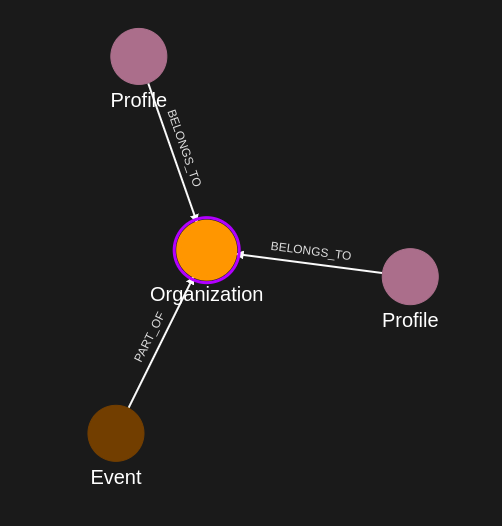
Organization structure:
- Organization1
- UserProfile(Alice) with role: "Member"
- UserProfile(Bob) with role: "Admin"
- Event1, Event2 (existing events)
User authentication:
- Alice logs in -> Token introspected -> User(alice-token) created
- Bob logs in -> Token introspected -> User(bob-token) created
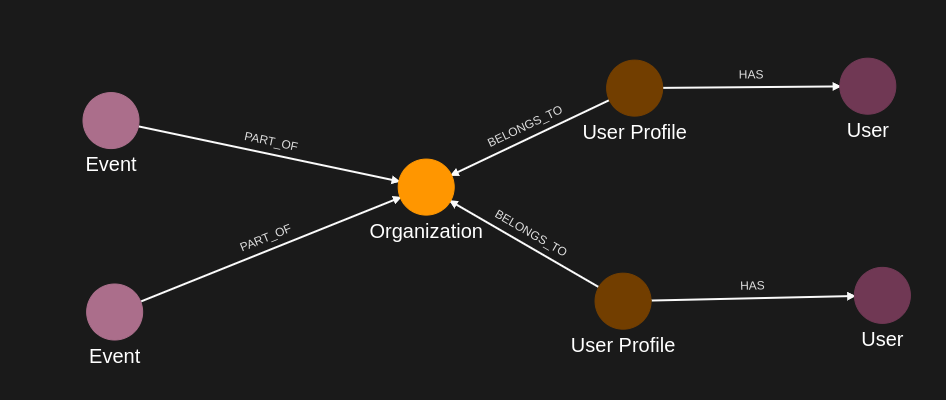
Graph after token introspection:
User(alice-token) -[_SAME_AS]-> UserProfile(Alice) -[MEMBER_OF {role:"Member"}]-> Organization1
User(bob-token) -[_SAME_AS]-> UserProfile(Bob) -[MEMBER_OF {role:"Admin"}]-> Organization1
Organization1 -[HAS]-> Event1, Event2
Authorization results:
- Alice (Member): Can READ Event1, Event2. Cannot CREATE events.
- Bob (Admin): Can READ Event1, Event2. Can CREATE Event3.
Requirements
Prerequisites:
- ServiceAccount credentials: For creating policies and queries (Bearer token)
- AppAgent credentials: For data ingestion and query execution (X-IK-ClientKey)
- User access tokens: JWT tokens for users (Alice, Bob) from your IdP
- Token Introspect configuration: Set up to validate your IdP's tokens
How user tokens are used:
- Pass user token in Authorization header: "Bearer {user_access_token}"
- Token Introspect validates and creates/updates User node
- User node becomes the subject for policy evaluation
Steps
Step 1: Ingest Organization and Event Data
- Authentication: AppAgent credential (X-IK-ClientKey header)
- Action: POST nodes: Organization, UserProfile (with roles), Event nodes
- Action: POST relationships: MEMBER_OF (with role property), HAS
- Result: Organization structure ready
Step 2: Create User Linking Policy
- Authentication: ServiceAccount credential (Bearer token)
- Action: POST policy allowing:
- READ on Subject nodes (for token introspection)
- UPSERT on User nodes (created from tokens)
- UPSERT on _SAME_AS relationships (User -> UserProfile)
- Result: Policy ID returned
Step 3: Create User Linking Query
- Authentication: ServiceAccount credential (Bearer token)
- Action: POST query that links introspected User to matching UserProfile
- Result: Query ID returned
Step 4: Execute with Alice's Token
- Authentication: AppAgent credential + Alice's user token (Bearer header)
- Action: POST to /contx-iq/v1/execute
- Result: User(alice) created and linked to UserProfile(Alice)
Step 5: Execute with Bob's Token
- Authentication: AppAgent credential + Bob's user token (Bearer header)
- Action: POST to /contx-iq/v1/execute
- Result: User(bob) created and linked to UserProfile(Bob)
Step 6: Create Role-Based Read Policy
- Authentication: ServiceAccount credential (Bearer token)
- Action: POST policy allowing Users to READ Events through:
User -[_SAME_AS]-> UserProfile -[MEMBER_OF]-> Organization -[HAS]-> Event
- Role filter: Applies to both "Member" and "Admin" roles
- Result: Policy ID returned
Step 7: Create Event Read Query
- Authentication: ServiceAccount credential (Bearer token)
- Action: POST query that reads Events for the authenticated user
- Result: Query ID returned
Step 8: Execute Read as Alice (Member)
- Authentication: AppAgent credential + Alice's token
- Action: POST to /contx-iq/v1/execute
- Result: Event1, Event2 returned (Alice can read events)
Step 9: Create Admin Write Policy
- Authentication: ServiceAccount credential (Bearer token)
- Action: POST policy allowing Users with Admin role to CREATE Events:
User -[_SAME_AS]-> UserProfile -[MEMBER_OF {role:"Admin"}]-> Organization
- Role filter: Only "Admin" role can upsert
- Result: Policy ID returned
Step 10: Create Event Write Query
- Authentication: ServiceAccount credential (Bearer token)
- Action: POST query that creates new Event and links to Organization
- Parameters: $eventId, $eventName
- Result: Query ID returned
Step 11: Execute Write as Bob (Admin)
- Authentication: AppAgent credential + Bob's token
- Action: POST to /contx-iq/v1/execute with event parameters
- Result: Event3 created and linked to Organization1
Step 1
Capture the nodes needed for this use case.
{
  "nodes": [
    {
      "external_id": "alice",
      "type": "UserProfile",
      "properties": [
        {
          "type": "email",
          "value": "alice@email.com"
        }
      ]
    },
    {
      "external_id": "bob",
      "type": "UserProfile",
      "properties": [
        {
          "type": "email",
          "value": "bob@email.com"
        }
      ]
    },
    {
      "external_id": "org1",
      "type": "Organization",
      "properties": [
        {
          "type": "name",
          "value": "Org1"
        }
      ]
    },
    {
      "external_id": "event_lambda",
      "type": "Event",
      "labels": [],
      "is_identity": false,
      "properties": [
        {
          "type": "title",
          "value": "Event Lambda",
          "metadata": {
            "assurance_level": 1,
            "source": "Some Source",
            "verified_time": "2024-04-10T06:28:16Z"
          }
        },
        {
          "type": "startDate",
          "value": "2025-01-01",
          "metadata": {
            "assurance_level": 1,
            "source": "Some Source",
            "verified_time": "2025-04-10T06:28:16Z"
          }
        },
        {
          "type": "link",
          "value": "https://events.com",
          "metadata": {
            "assurance_level": 1,
            "source": "Some Source",
            "verified_time": "2025-04-10T06:28:16Z"
          }
        },
        {
          "type": "description",
          "value": "Description ...",
          "metadata": {
            "assurance_level": 1,
            "source": "Some Source",
            "verified_time": "2025-04-10T06:28:16Z"
          }
        }
      ]
    }
  ]
}
Capture the relationships needed for this use case.
{
  "relationships": [
    {
      "source": {
        "external_id": "alice",
        "type": "UserProfile"
      },
      "target": {
        "external_id": "org1",
        "type": "Organization"
      },
      "type": "BELONGS_TO",
      "properties": [
        {
          "type": "role",
          "value": "Member"
        }
      ]
    },
    {
      "source": {
        "external_id": "bob",
        "type": "UserProfile"
      },
      "target": {
        "external_id": "org1",
        "type": "Organization"
      },
      "type": "BELONGS_TO",
      "properties": [
        {
          "type": "role",
          "value": "Admin"
        }
      ]
    },
    {
      "source": {
        "external_id": "event_lambda",
        "type": "Event"
      },
      "target": {
        "external_id": "org1",
        "type": "Organization"
      },
      "type": "PART_OF"
    }
  ]
}
Step 2
Create a CIQ Policy which designates the Subject nodes can be read,
the User nodes can be upserted and relationships between User and UserProfile can be upserted.
{
  "meta": {
    "policy_version": "1.0-ciq"
  },
  "subject": {
    "type": "UserProfile"
  },
  "condition": {
    "cypher": "MATCH (subject:UserProfile)",
    "filter": [
      {
        "operator": "=",
        "attribute": "subject.external_id",
        "value": "$subject_external_id"
      }
    ]
  },
  "allowed_reads": {
    "nodes": [
      "subject",
      "subject.*"
    ]
  },
  "allowed_upserts": {
    "nodes": {
      "node_types": [
        "User"
      ]
    },
    "relationships": {
      "relationship_types": [
        {
          "type": "HAS",
          "source_node_label": "UserProfile",
          "target_node_label": "User"
        }
      ]
    }
  }
}
Request to create the CIQ Policy configuration using REST.
{
  "project_id": "your_project_gid",
  "description": "description of policy",
  "display_name": "policy name",
  "name": "policy-name",
  "policy": "{\"meta\":{\"policy_version\":\"1.0-ciq\"},\"subject\":{\"type\":\"UserProfile\"},\"condition\":{\"cypher\":\"MATCH (subject:UserProfile)\",\"filter\":[{\"operator\":\"=\",\"attribute\":\"subject.external_id\",\"value\":\"$subject_external_id\"}]},\"allowed_reads\":{\"nodes\":[\"subject\",\"subject.*\"]},\"allowed_upserts\":{\"nodes\":{\"node_types\":[\"User\"]},\"relationships\":{\"relationship_types\":[{\"type\":\"HAS\",\"source_node_label\":\"UserProfile\",\"target_node_label\":\"User\"}]}}}",
  "status": "ACTIVE",
  "tags": []
}
Request to read the CIQ Policy configuration using REST.
{
  "id": "your_policy_configuration_gid"
}
Step 3
Create a CIQ Query in the context of the policy to retrieve and upsert the data. The labels: ["DigitalTwin"] entry creates the User as an identity node - the same result as is_identity: true in the Capture API.
{
  "nodes": [
    "subject",
    "subject.property.email",
    "user.property.email"
  ],
  "relationships": [],
  "upsert_nodes": [
    {
      "name": "user",
      "type": "User",
      "external_id": "$token.sub",
      "labels": [
        "DigitalTwin"
      ],
      "properties": [
        {
          "type": "email",
          "value": "$email"
        }
      ]
    }
  ],
  "upsert_relationships": [
    {
      "name": "has",
      "source": "subject",
      "target": "user",
      "type": "HAS"
    }
  ]
}
Request to create a CIQ Query configuration using REST.
{
  "project_id": "your_project_gid",
  "description": "description of knowledge query",
  "display_name": "knowledge query name",
  "name": "knowledge-query-name",
  "policy_id": "your_policy_gid",
  "query": "{\"nodes\":[\"subject\",\"subject.property.email\",\"user.property.email\"],\"relationships\":[],\"upsert_nodes\":[{\"name\":\"user\",\"type\":\"User\",\"external_id\":\"$token.sub\",\"labels\":[\"DigitalTwin\"],\"properties\":[{\"type\":\"email\",\"value\":\"$email\"}]}],\"upsert_relationships\":[{\"name\":\"has\",\"source\":\"subject\",\"target\":\"user\",\"type\":\"HAS\"}]}",
  "status": "ACTIVE"
}
Read the CIQ Query Configuration.
{
  "id": "your_knowledge_query_configuration_gid"
}
Step 4
Run a CIQ Execution to create a User node from the first access token and link it to the corresponding UserProfile.
{
  "id": "knowledge_query_gid",
  "input_params": {
    "subject_external_id": "alice",
    "user_external_id": "alice_user_external_id",
    "email": "alice@email.com"
  },
  "page_token": 1
}
CIQ Execution response.
{
  "data": [
    {
      "nodes": {
        "subject": {
          "Id": 14,
          "ElementId": "4:0f1c76a0-92f1-4474-80af-aa4c317e636a:14",
          "Labels": [
            "Unique",
            "Resource",
            "UserProfile"
          ],
          "Props": {
            "_service": "capture-api",
            "create_time": "2025-06-13T16:08:25.47Z",
            "external_id": "alice",
            "id": "4H1gEySmTGasbkjWDyyuXg",
            "type": "UserProfile",
            "update_time": "2025-06-13T16:08:25.47Z"
          }
        },
        "subject.property.email": "alice@email.com",
        "user.property.email": "alice@email.com"
      }
    }
  ]
}
Step 5
Run a CIQ Execution to create a User node from the second access token and link it to the corresponding UserProfile.
{
  "id": "knowledge_query_gid",
  "input_params": {
    "subject_external_id": "bob",
    "user_external_id": "bob_user_external_id",
    "email": "bob@email.com"
  },
  "page_token": 1
}
CIQ Execution response.
{
  "data": [
    {
      "nodes": {
        "subject": {
          "Id": 15,
          "ElementId": "4:0f1c76a0-92f1-4474-80af-aa4c317e636a:15",
          "Labels": [
            "Unique",
            "Resource",
            "UserProfile"
          ],
          "Props": {
            "_service": "capture-api",
            "create_time": "2025-06-13T16:08:25.47Z",
            "external_id": "bob",
            "id": "lIHALUiJSSiwVCff51KxxA",
            "type": "UserProfile",
            "update_time": "2025-06-13T16:08:25.47Z"
          }
        },
        "subject.property.email": "bob@email.com",
        "user.property.email": "bob@email.com"
      }
    }
  ]
}
Step 6
Create a CIQ Policy which designates the nodes which are allowed to read the Event nodes linked to the Organization nodes they have a relationship with, according to a specific role.
{
  "meta": {
    "policy_version": "1.0-ciq"
  },
  "subject": {
    "type": "UserProfile"
  },
  "condition": {
    "cypher": "MATCH (user:User)<-[:HAS]-(subject:UserProfile)-[bt:BELONGS_TO]->(org:Organization)<-[:PART_OF]-(event:Event)",
    "filter": [
      {
        "operator": "AND",
        "operands": [
          {
            "operator": "=",
            "attribute": "subject.external_id",
            "value": "$subject_external_id"
          },
          {
            "operator": "=",
            "attribute": "user.external_id",
            "value": "$token.sub"
          },
          {
            "operator": "=",
            "attribute": "bt.role",
            "value": "Member"
          }
        ]
      }
    ]
  },
  "allowed_reads": {
    "nodes": [
      "event",
      "event.*",
      "org.external_id",
      "subject.property.name"
    ]
  }
}
Json to create the CIQ Policy configuration using REST.
{
  "project_id": "your_project_gid",
  "description": "description of policy",
  "display_name": "policy name",
  "name": "policy-name",
  "policy": "{\"meta\":{\"policy_version\":\"1.0-ciq\"},\"subject\":{\"type\":\"UserProfile\"},\"condition\":{\"cypher\":\"MATCH (user:User)<-[:HAS]-(subject:UserProfile)-[bt:BELONGS_TO]->(org:Organization)<-[:PART_OF]-(event:Event)\",\"filter\":[{\"operator\":\"AND\",\"operands\":[{\"operator\":\"=\",\"attribute\":\"subject.external_id\",\"value\":\"$subject_external_id\"},{\"operator\":\"=\",\"attribute\":\"user.external_id\",\"value\":\"$token.sub\"},{\"operator\":\"=\",\"attribute\":\"bt.role\",\"value\":\"Member\"}]}]},\"allowed_reads\":{\"nodes\":[\"event\",\"event.*\",\"org.external_id\",\"subject.property.name\"]}}",
  "status": "ACTIVE",
  "tags": []
}
Json to read the CIQ Policy configuration using REST.
{
  "id": "your_policy_configuration_gid"
}
Step 7
Create a CIQ Query in the context of the policy to retrieve data.
{
  "nodes": [
    "event"
  ],
  "filter": {
    "attribute": "subject.property.email",
    "operator": "=",
    "value": "$email"
  }
}
Json to create a CIQ Query configuration using REST.
{
  "project_id": "your_project_gid",
  "description": "description of knowledge query",
  "display_name": "knowledge query name",
  "name": "knowledge-query-name",
  "policy_id": "your_policy_gid",
  "query": "{\"nodes\":[\"event\"],\"filter\":{\"attribute\":\"subject.property.email\",\"operator\":\"=\",\"value\":\"$email\"}}",
  "status": "ACTIVE"
}
Read the CIQ Query Configuration.
{
  "id": "your_knowledge_query_configuration_gid"
}
Step 8
Run a CIQ Execution to read the data.
{
  "id": "knowledge_query_gid",
  "input_params": {
    "email": "alice@email.com",
    "subject_external_id": "alice"
  },
  "page_token": 1
}
CIQ Execution response.
{
  "data": [
    {
      "nodes": {
        "event": {
          "Id": 8,
          "ElementId": "4:0f1c76a0-92f1-4474-80af-aa4c317e636a:8",
          "Labels": [
            "Unique",
            "Resource",
            "Event"
          ],
          "Props": {
            "_service": "capture-api",
            "create_time": "2025-06-13T16:08:11.293Z",
            "external_id": "event_lambda",
            "id": "ABeHsubWR7a3Yj0lOSuKRA",
            "type": "Event",
            "update_time": "2025-06-13T16:08:11.293Z"
          }
        }
      }
    }
  ]
}
Step 9
Create a CIQ Policy which designates the nodes which are allowed to upsert Event nodes linked to the Organization nodes they have a relationship with, according to a specific role.
{
  "meta": {
    "policy_version": "1.0-ciq"
  },
  "subject": {
    "type": "UserProfile"
  },
  "condition": {
    "cypher": "MATCH (user:User)<-[:HAS]-(subject:UserProfile)-[bt:BELONGS_TO]->(org:Organization)",
    "filter": [
      {
        "operator": "AND",
        "operands": [
          {
            "operator": "=",
            "attribute": "subject.external_id",
            "value": "$profile_external_id"
          },
          {
            "operator": "=",
            "attribute": "$token.sub",
            "value": "$user_external_id"
          },
          {
            "operator": "=",
            "attribute": "bt.role",
            "value": "Admin"
          }
        ]
      }
    ]
  },
  "allowed_reads": {
    "nodes": [
      "org.external_id",
      "subject.property.name"
    ]
  },
  "allowed_upserts": {
    "nodes": {
      "node_types": [
        "Event"
      ]
    },
    "relationships": {
      "relationship_types": [
        {
          "type": "PART_OF",
          "source_node_label": "Event",
          "target_node_label": "Organization"
        }
      ]
    }
  }
}
Json to create the CIQ Policy configuration using REST.
{
  "project_id": "your_project_gid",
  "description": "description of policy",
  "display_name": "policy name",
  "name": "policy-name",
  "policy": "{\"meta\":{\"policy_version\":\"1.0-ciq\"},\"subject\":{\"type\":\"UserProfile\"},\"condition\":{\"cypher\":\"MATCH (user:User)<-[:HAS]-(subject:UserProfile)-[bt:BELONGS_TO]->(org:Organization)\",\"filter\":[{\"operator\":\"AND\",\"operands\":[{\"operator\":\"=\",\"attribute\":\"subject.external_id\",\"value\":\"$profile_external_id\"},{\"operator\":\"=\",\"attribute\":\"$token.sub\",\"value\":\"$user_external_id\"},{\"operator\":\"=\",\"attribute\":\"bt.role\",\"value\":\"Admin\"}]}]},\"allowed_reads\":{\"nodes\":[\"org.external_id\",\"subject.property.name\"]},\"allowed_upserts\":{\"nodes\":{\"node_types\":[\"Event\"]},\"relationships\":{\"relationship_types\":[{\"type\":\"PART_OF\",\"source_node_label\":\"Event\",\"target_node_label\":\"Organization\"}]}}}",
  "status": "ACTIVE",
  "tags": []
}
Json to read the CIQ Policy configuration using REST.
{
  "id": "your_policy_configuration_gid"
}
Step 10
Create a CIQ Query in the context of the policy to upsert an Event node.
{
  "nodes": [
    "event",
    "event.property.title",
    "event.property.link"
  ],
  "relationships": [],
  "upsert_nodes": [
    {
      "name": "event",
      "type": "Event",
      "external_id": "$eventId",
      "properties": [
        {
          "type": "title",
          "value": "$title"
        },
        {
          "type": "link",
          "value": "$link"
        }
      ]
    }
  ],
  "upsert_relationships": [
    {
      "name": "part",
      "source": "event",
      "target": "org",
      "type": "PART_OF"
    }
  ]
}
Json to create a CIQ Query configuration using REST.
{
  "project_id": "your_project_gid",
  "description": "description of knowledge query",
  "display_name": "knowledge query name",
  "name": "knowledge-query-name",
  "policy_id": "your_policy_gid",
  "query": "{\"nodes\":[\"event\",\"event.property.title\",\"event.property.link\"],\"relationships\":[],\"upsert_nodes\":[{\"name\":\"event\",\"type\":\"Event\",\"external_id\":\"$eventId\",\"properties\":[{\"type\":\"title\",\"value\":\"$title\"},{\"type\":\"link\",\"value\":\"$link\"}]}],\"upsert_relationships\":[{\"name\":\"part\",\"source\":\"event\",\"target\":\"org\",\"type\":\"PART_OF\"}]}",
  "status": "ACTIVE"
}
Read the CIQ Query Configuration.
{
  "id": "your_knowledge_query_configuration_gid"
}
Step 11
Run a CIQ Execution to upsert an Event node.
{
  "id": "knowledge_query_gid",
  "input_params": {
    "profile_external_id": "bob",
    "user_external_id": "bob_user_external_id",
    "eventId": "event14",
    "title": "Event in the parking lot",
    "link": "https://www.example.com"
  },
  "page_token": 1
}
CIQ Execution response.
{
  "data": [
    {
      "nodes": {
        "event": {
          "Id": 24,
          "ElementId": "4:0f1c76a0-92f1-4474-80af-aa4c317e636a:24",
          "Labels": [
            "Unique",
            "Resource",
            "Event"
          ],
          "Props": {
            "create_time": "2025-06-13T16:23:53.388Z",
            "external_id": "event14",
            "id": "sYE-gBnaRQeRO6gZdHA59A",
            "type": "Event",
            "update_time": "2025-06-13T16:23:53.388Z"
          }
        },
        "event.property.link": "https://www.example.com",
        "event.property.title": "Event in the parking lot"
      }
    }
  ]
}
API Endpoints
/capture/v1/nodes/capture/v1/relationships/configs/v1/authorization-policies/configs/v1/knowledge-queries/contx-iq/v1/execute