
ContX IQ: Delete Node Properties and Relationship Properties
This example demonstrates fine-grained delete operations:
Delete types supported:
1. Delete entire nodes (and their relationships)
2. Delete specific properties from nodes (node remains)
3. Delete specific properties from relationships (relationship remains)
Example operations:
- Delete LicenseNumber nodes entirely
- Delete Car.model and Car.vin properties (Car nodes remain)
- Delete OWNS.weight property (OWNS relationship remains)
Use cases:
- GDPR right-to-erasure (selective data removal)
- Data cleanup and normalization
- Removing deprecated properties
Use case
Scenario: Remove sensitive/deprecated data while preserving graph structure.
Initial state:
Person(Alice) -[OWNS {weight: "100kg"}]-> Car(model: "Mustang", vin: "ABC123")
Car -[HAS]-> LicenseNumber("ABC-123")
Delete operations:
1. Delete LicenseNumber nodes (and HAS relationships)
2. Delete Car.model and Car.vin properties
3. Delete OWNS.weight property
Final state:
Person(Alice) -[OWNS]-> Car()
- LicenseNumber nodes gone
- Car nodes exist but without model/vin properties
- OWNS relationship exists but without weight property
Query returns IDs of all modified nodes for confirmation.
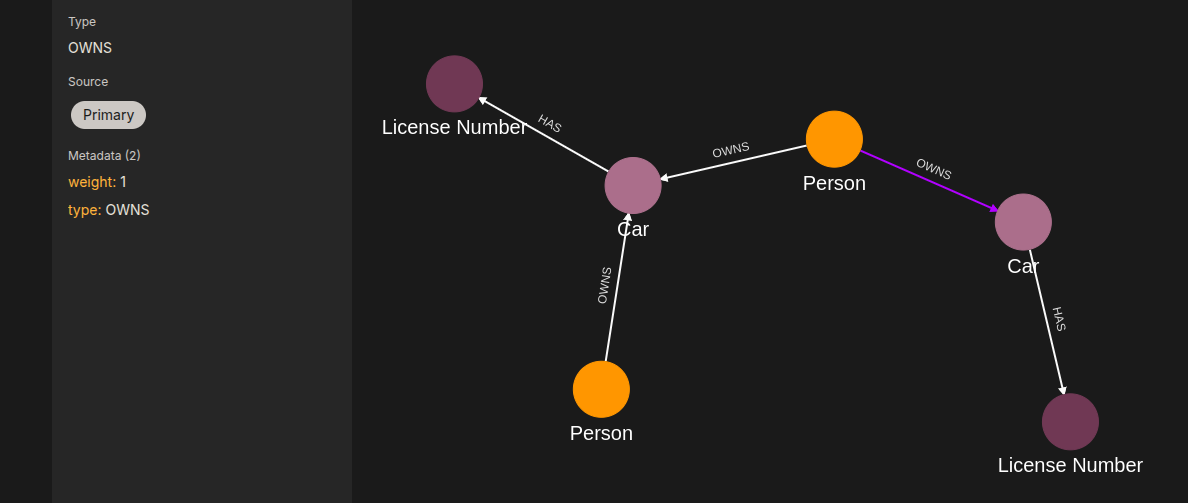
Requirements
Prerequisites:
- ServiceAccount credentials: For creating policies and queries (Bearer token)
- AppAgent credentials: For data ingestion and query execution (X-IK-ClientKey)
- User access token: For authorized delete operations
Delete authorization:
- Policy specifies allowed_deletes.nodes and allowed_deletes.properties
- User must be authorized for each type of delete operation
Steps
Step 1: Ingest Graph with Properties to Delete
- Authentication: AppAgent credential (X-IK-ClientKey header)
- Action: POST nodes with properties (model, vin, etc.) and relationships with properties (weight)
- Result: Graph ready for delete operations
Step 2: Create Delete Policy
- Authentication: ServiceAccount credential (Bearer token)
- Action: POST policy with:
- allowed_deletes.nodes: [LicenseNumber]
- allowed_deletes.node_properties: [{label: Car, properties: [model, vin]}]
- allowed_deletes.relationship_properties: [{type: OWNS, properties: [weight]}]
- Result: Policy ID returned
Step 3: Create Delete Query
- Authentication: ServiceAccount credential (Bearer token)
- Action: POST query that:
- Matches and deletes LicenseNumber nodes
- Removes model, vin properties from Car nodes
- Removes weight property from OWNS relationships
- Returns external_ids of modified nodes
- Result: Query ID returned
Step 4: Execute Delete Operations
- Authentication: AppAgent credential + User token
- Action: POST to /contx-iq/v1/execute
- Result: Returns list of modified node IDs; properties/nodes deleted from graph
Step 1
Capture the nodes needed for this use case.
{
  "nodes": [
    {
      "external_id": "alice",
      "type": "Person",
      "is_identity": true,
      "properties": [
        {
          "type": "email",
          "value": "alice@email.com"
        },
        {
          "type": "name",
          "value": "Alice Smith"
        }
      ]
    },
    {
      "external_id": "satchmo",
      "type": "Person",
      "is_identity": true,
      "properties": [
        {
          "type": "email",
          "value": "satchmo@demo.com"
        },
        {
          "type": "name",
          "value": "Louis Armstrong"
        }
      ]
    },
    {
      "external_id": "karel",
      "type": "Person",
      "is_identity": true,
      "properties": [
        {
          "type": "email",
          "value": "karel@demo.com"
        },
        {
          "type": "name",
          "value": "Karel Plihal"
        }
      ]
    },
    {
      "external_id": "kitt",
      "type": "Car",
      "is_identity": false,
      "properties": [
        {
          "type": "manufacturer",
          "value": "pontiac"
        },
        {
          "type": "model",
          "value": "Firebird"
        }
      ]
    },
    {
      "external_id": "caddilacv16",
      "type": "Car",
      "is_identity": false,
      "properties": [
        {
          "type": "manufacturer",
          "value": "Caddilac"
        },
        {
          "type": "model",
          "value": "V-16"
        }
      ]
    },
    {
      "external_id": "harmonika",
      "type": "Bus",
      "is_identity": false,
      "properties": [
        {
          "type": "manufacturer",
          "value": "Ikarus"
        },
        {
          "type": "model",
          "value": "280"
        }
      ]
    },
    {
      "external_id": "ln-xxx",
      "type": "LicenseNumber",
      "is_identity": false,
      "properties": [
        {
          "type": "license",
          "value": "ln-xxx-value"
        }
      ]
    },
    {
      "external_id": "ln-yyy",
      "type": "LicenseNumber",
      "is_identity": false,
      "properties": [
        {
          "type": "license",
          "value": "ln-yyy-value"
        }
      ]
    },
    {
      "external_id": "ln-zzz",
      "type": "LicenseNumber",
      "is_identity": false,
      "properties": [
        {
          "type": "license",
          "value": "ln-zzz-value"
        }
      ]
    }
  ]
}
Capture the relationships needed for this use case.
{
  "relationships": [
    {
      "source": {
        "external_id": "alice",
        "type": "Person"
      },
      "target": {
        "external_id": "kitt",
        "type": "Car"
      },
      "type": "OWNS",
      "properties": [
        {
          "type": "weight",
          "value": 1
        }
      ]
    },
    {
      "source": {
        "external_id": "alice",
        "type": "Person"
      },
      "target": {
        "external_id": "caddilacv16",
        "type": "Car"
      },
      "type": "OWNS",
      "properties": [
        {
          "type": "weight",
          "value": 2
        }
      ]
    },
    {
      "source": {
        "external_id": "satchmo",
        "type": "Person"
      },
      "target": {
        "external_id": "caddilacv16",
        "type": "Car"
      },
      "type": "OWNS"
    },
    {
      "source": {
        "external_id": "karel",
        "type": "Person"
      },
      "target": {
        "external_id": "harmonika",
        "type": "Bus"
      },
      "type": "OWNS"
    },
    {
      "source": {
        "external_id": "kitt",
        "type": "Car"
      },
      "target": {
        "external_id": "ln-xxx",
        "type": "LicenseNumber"
      },
      "type": "HAS",
      "properties": [
        {
          "type": "weight",
          "value": 3
        }
      ]
    },
    {
      "source": {
        "external_id": "caddilacv16",
        "type": "Car"
      },
      "target": {
        "external_id": "ln-zzz",
        "type": "LicenseNumber"
      },
      "type": "HAS"
    },
    {
      "source": {
        "external_id": "harmonika",
        "type": "Bus"
      },
      "target": {
        "external_id": "ln-yyy",
        "type": "LicenseNumber"
      },
      "type": "HAS"
    }
  ]
}
Step 2
Create a CIQ Policy which designates the Subject node, the cypher, the nodes allowed to be deleted and the nodes allowed to be read.
{
  "meta": {
    "policy_version": "1.0-ciq"
  },
  "subject": {
    "type": "Person"
  },
  "condition": {
    "cypher": "MATCH (subject:Person)-[r1:OWNS]->(car:Car)-[r2:HAS]->(ln:LicenseNumber)",
    "filter": [
      {
        "app": "postman",
        "operator": "=",
        "attribute": "subject.external_id",
        "value": "$subject_external_id"
      }
    ]
  },
  "allowed_reads": {
    "nodes": [
      "subject.*",
      "ln.property.value"
    ],
    "relationships": [
      "r1.*",
      "r2.*"
    ]
  },
  "allowed_deletes": {
    "nodes": [
      "ln",
      "ln.*",
      "car.*"
    ],
    "relationships": [
      "r1.*",
      "r1",
      "r2"
    ]
  }
}
Request to create the CIQ Policy configuration using REST.
{
  "project_id": "your_project_gid",
  "description": "description of policy",
  "display_name": "policy name",
  "name": "policy-name",
  "policy": "{\"meta\":{\"policy_version\":\"1.0-ciq\"},\"subject\":{\"type\":\"Person\"},\"condition\":{\"cypher\":\"MATCH (subject:Person)-[r1:OWNS]->(car:Car)-[r2:HAS]->(ln:LicenseNumber)\",\"filter\":[{\"app\":\"postman\",\"operator\":\"=\",\"attribute\":\"subject.external_id\",\"value\":\"$subject_external_id\"}]},\"allowed_reads\":{\"nodes\":[\"subject.*\",\"ln.property.value\"],\"relationships\":[\"r1.*\",\"r2.*\"]},\"allowed_deletes\":{\"nodes\":[\"ln\",\"ln.*\",\"car.*\"],\"relationships\":[\"r1.*\",\"r1\",\"r2\"]}}",
  "status": "ACTIVE",
  "tags": []
}
Request to read the CIQ Policy configuration using REST.
{
  "id": "your_policy_configuration_gid"
}
Step 3
Create a CIQ Knwledge Query in the context of the policy to delete License Number nodes, delete the model and vin properties of Car nodes, and delete the weight properties of OWNS relationships of the authorized subject.
{
  "nodes": [
    "subject.external_id"
  ],
  "delete_nodes": [
    "ln",
    "car.property.model",
    "car.property.vin"
  ],
  "delete_relationships": [
    "r1.weight"
  ]
}
Request to create a CIQ Knowledge Query configuration using REST.
{
  "project_id": "your_project_gid",
  "description": "description of knowledge query",
  "display_name": "knowledge query name",
  "name": "knowledge-query-name",
  "policy_id": "your_policy_gid",
  "query": "{\"nodes\":[\"subject.external_id\"],\"delete_nodes\":[\"ln\",\"car.property.model\",\"car.property.vin\"],\"delete_relationships\":[\"r1.weight\"]}",
  "status": "ACTIVE"
}
Read the CIQ Query Configuration.
{
  "id": "your_knowledge_query_configuration_gid"
}
Step 4
Run a CIQ query to identify and return the external_id of all nodes that have had properties removed. Also, identify nodes that are connected to relationships from which properties have been deleted.
{
  "id": "knowledge_query_gid",
  "input_params": {
    "subject_external_id": "alice"
  },
  "page_token": 1
}
CIQ Execution response.
{
  "data": [
    {
      "nodes": {
        "subject.external_id": "alice"
      }
    },
    {
      "nodes": {
        "subject.external_id": "alice"
      }
    }
  ]
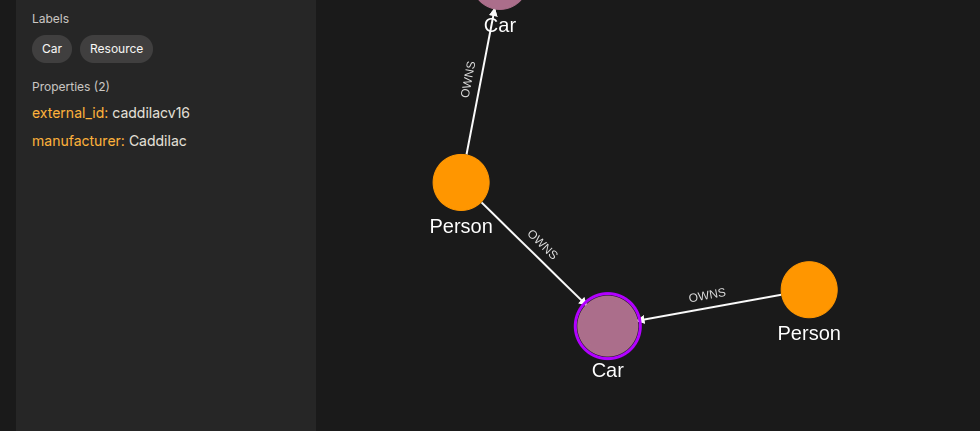
}
API Endpoints
/capture/v1/nodes/capture/v1/relationships/configs/v1/authorization-policies/configs/v1/knowledge-queries/contx-iq/v1/execute