
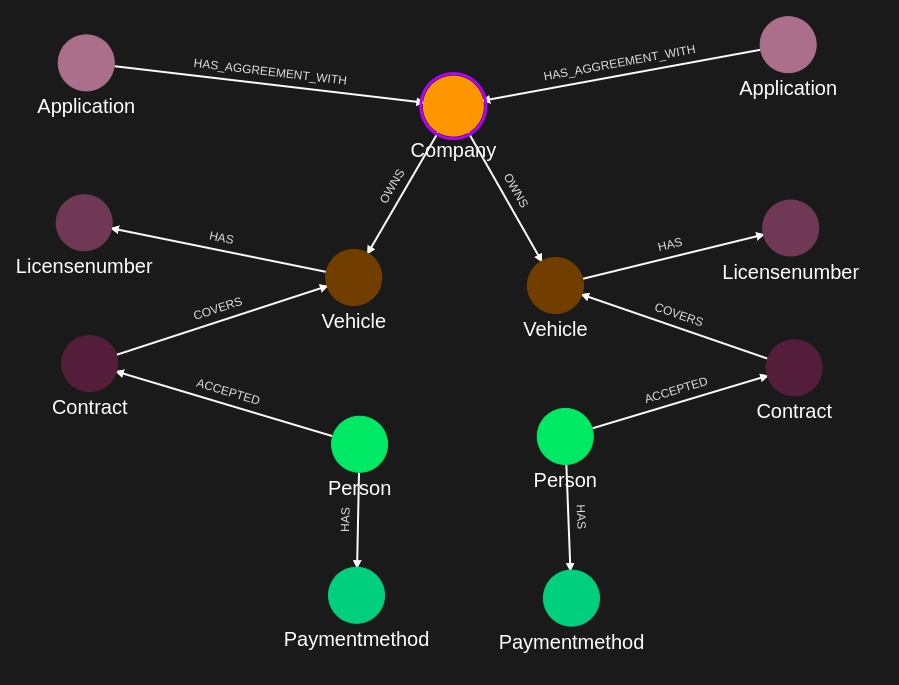
What is the IKG data schema?
The IndyKite Knowledge Graph (IKG) is a property graph. Everything you store is one of three things:
- Nodes: entities such as
Person,Car,Contract, orDevice. - Relationships: directed, typed connections between two nodes, such as
OWNSorCAN_DRIVE. - Properties: typed values attached to a node or a relationship, optionally carrying provenance metadata.
There is no schema definition step: you do not declare node types or property names up front. The schema emerges from the data you ingest. What the platform does enforce is the shape of that data - field structure, value types, and size limits - at every write, whether the data arrives through the Capture API or a ContX IQ upsert.
The platform keeps track of the schema that emerges - which node types exist, which properties they carry, how they are connected - and exposes it through the Data Schema API, so you can read your project's schema back at any time.
This guide is the reference for the data shapes and rules, and for the Data Schema endpoint.
What is a node?
A node represents one entity. Its JSON shape, as sent to POST /capture/v1/nodes:
{
	"external_id": "millicent",
	"type": "Person",
	"is_identity": true,
	"labels": ["Customer"],
	"properties": [
		{ "type": "email", "value": "millicent@email.com" }
	]
}| Field | Required | Rules | Meaning |
external_id |
yes | 1–256 characters | Your identifier for the entity - a customer number, serial number, or any ID from your source system. |
type |
yes | 2–64 characters. Convention: PascalCase. | The node's kind, e.g. Person, Car. Becomes the graph label that policies and queries match on. |
is_identity |
no | boolean | true marks an identity node - a person or other actor that can appear as a subject in authorization decisions. Omit or false for plain resource nodes. |
labels |
no | array of strings. Convention: PascalCase. | Additional labels beyond type for cross-cutting classification. |
properties |
no | array | Typed values - see properties below. |
location |
no | 2–32 characters; must be a key of the project's alias_mapping |
Composite IKG only: routes the node to a constituent database. See the Data Residency guide. |
How is a node identified?
The pair (type, external_id) uniquely identifies a node. Writes are upserts: posting the same pair again updates the existing node instead of creating a duplicate. The same pair is how relationships, deletes, and policies reference a node.
The platform also assigns every node a read-only, globally unique id with a gid: prefix, returned in API responses:
{ "results": [ { "id": "gid:AAAAFezwD2VFdEHnhBmHdGqTDLU" } ] }You never set id yourself - your own reference is always the (type, external_id) pair.
Identity nodes vs. resource nodes
The is_identity flag splits the graph into two roles:
- Identity nodes (
is_identity: true): actors - people, service accounts, agents. These are the subjects of AuthZEN authorization decisions. - Resource nodes (default): everything else - the things being owned, accessed, or acted upon.
What is a relationship?
A relationship is a directed, typed edge between two existing nodes, each referenced by its (type, external_id) pair. Its JSON shape, as sent to POST /capture/v1/relationships:
{
	"source": { "external_id": "millicent", "type": "Person" },
	"target": { "external_id": "kitt", "type": "Car" },
	"type": "OWNS",
	"properties": [
		{ "type": "since", "value": "2024-01-15" }
	]
}| Field | Required | Rules | Meaning |
source |
yes | external_id + type |
The node the relationship points from. |
target |
yes | external_id + type |
The node the relationship points to. |
type |
yes | max 128 characters. Convention: an uppercase verb in UPPER_SNAKE_CASE. | The relationship's kind, e.g. OWNS, CAN_DRIVE, BELONGS_TO. |
properties |
no | array | Same property shape as on nodes, including metadata. |
Direction matters
A relationship always runs from source to target. Person -[OWNS]→ Car and Car -[OWNS]→ Person are two different edges. Model in the direction that reads naturally as a sentence - queries and policies can still traverse edges in either direction, but the stored direction is part of the schema your Cypher patterns match against.
A relationship is addressed by its (source, target, type) triple: writes are upserts on that triple, and the delete endpoint identifies the edge the same way. Like nodes, every relationship also receives a read-only platform-assigned gid: identifier, returned in the API response.
What is a property?
A property is a named, typed value on a node or relationship:
{
	"type": "email",
	"value": "millicent@email.com"
}
Property names (type) can be up to 128 characters. The convention is snake_case or camelCase, e.g. given_name, startDate.
Which value types are supported?
| Type | JSON example |
| String | "value": "Millicent" |
| Integer | "value": 42 |
| Float | "value": 4.5 |
| Boolean | "value": true |
| Array | "value": ["red", "green"] |
Timestamps are stored as RFC 3339 strings, e.g. "2026-04-10T06:28:16Z". Keep each property a single value or a flat array; represent structured data as separate properties or - better - as separate nodes connected by relationships. If you find yourself nesting objects inside a property, that is usually a sign the object should be a node.
Value or external value?
A property carries either a stored value or an external_value - a reference to an External Data Resolver configuration that fetches the value from an external API at query time, so the data itself never lives in the IKG:
{
	"type": "current_value",
	"external_value": { "name": "vehicle-pricing-resolver" }
}
What is property metadata?
Every property - on nodes and relationships alike - can carry a metadata object recording where the value came from and how much to trust it:
{
	"type": "name",
	"value": "Millicent Contextsworth",
	"metadata": {
		"assurance_level": 3,
		"source": "BRREG",
		"verified_time": "2026-04-10T06:28:16Z",
		"custom_metadata": { "verification_method": "passport" }
	}
}| Field | Rules | Meaning |
assurance_level |
1, 2, or 3 |
Confidence level of the value's verification - higher means stronger assurance. |
source |
string | The system or authority the value came from, e.g. "BRREG". |
verified_time |
RFC 3339 timestamp | When the value was last verified. |
custom_metadata |
object | Free-form key/value provenance of your own. |
Metadata is per-property, not per-node: two properties on the same node can come from different sources at different assurance levels. Trust Score profiles aggregate these fields into a queryable trustworthiness score.
Naming rules and limits at a glance
| Element | Limit / convention | Examples |
Node type |
2–64 chars; PascalCase by convention | Person, PaymentMethod |
Node external_id |
1–256 chars | millicent, VIN-1982-KITT |
Node labels |
strings; PascalCase by convention | Customer, DigitalTwin |
Relationship type |
max 128 chars; uppercase verb by convention | OWNS, CAN_DRIVE |
| Property name | max 128 chars; snake_case or camelCase by convention | email, given_name |
Metadata assurance_level |
1, 2, or 3 |
- |
location |
2–32 chars; a key of the project's alias_mapping; composite IKG only |
east, eu-west |
| Nodes / relationships per Capture request | 1–250 | - |
A request that violates a limit fails with 400 Bad Request and an errors[] array naming the offending fields (e.g. a missing external_id or type, or a batch size outside 1–250). An unknown location (or any location on a non-composite project) fails with 422 Unprocessable Entity. The authoritative field reference is the public OpenAPI specification.
A complete example
A minimal vehicle-rental schema: one identity node, one resource node, one directed edge.
POST /capture/v1/nodes
{
	"nodes": [
		{
			"external_id": "millicent",
			"type": "Person",
			"is_identity": true,
			"properties": [
				{ "type": "email", "value": "millicent@email.com" },
				{
					"type": "name",
					"value": "Millicent Contextsworth",
					"metadata": {
						"assurance_level": 2,
						"source": "id-verification",
						"verified_time": "2026-04-10T06:28:16Z"
					}
				}
			]
		},
		{
			"external_id": "kitt",
			"type": "Car",
			"properties": [
				{ "type": "manufacturer", "value": "Pontiac" },
				{ "type": "seats", "value": 2 }
			]
		}
	]
}
POST /capture/v1/relationships
{
	"relationships": [
		{
			"source": { "external_id": "millicent", "type": "Person" },
			"target": { "external_id": "kitt", "type": "Car" },
			"type": "CAN_DRIVE",
			"properties": [
				{ "type": "valid_until", "value": "2027-01-01" }
			]
		}
	]
}
Resulting graph:
Person(millicent) -[CAN_DRIVE {valid_until}]-> Car(kitt)From here the data is immediately usable: a KBAC policy can grant Person the DRIVE action on Car where the CAN_DRIVE edge exists, and a ContX IQ query can return every car a person can drive.
How do I read my project's data schema?
The Data Schema API returns the schema the IKG has observed for your project - every node type, its properties with their value types, its labels, and every relationship type between node types - as a JSON Graph Format (JGF) v2 document. It is a schema-level view: types and occurrence counts, not the data itself.
Endpoint:
- EU:
GET https://eu.api.indykite.com/data-schema/v1/ - US:
GET https://us.api.indykite.com/data-schema/v1/
The request authenticates the calling application: pass the AppAgent credential in the X-IK-ClientKey header, as is, without any prefix (see the Credentials guide). The project is derived from the credential - there are no parameters.
curl -H "X-IK-ClientKey: $CLIENT_KEY" https://eu.api.indykite.com/data-schema/v1/Response structure
The response is one graph object:
| Field | Meaning |
graph.directed |
Always a directed graph. |
graph.metadata |
created_at and updated_at timestamps of the schema. |
graph.nodes |
A map keyed by node type. Each entry's metadata holds node_count (how many nodes of the type exist), properties (a map keyed by property name - below), system_labels, and user_defined_labels (each a list of { name, count }). |
graph.edges |
One entry per (source type, relation, target type) combination: source and target node types, the relation (relationship type), directed, and metadata with the edge count and its properties map. |
Each entry in a properties map describes one property: how many times it occurs (count), the observed value types with per-type counts (types), and - for node properties - a metadata map with the same statistics for the provenance fields attached to that property.
Example
After ingesting the vehicle-rental example above, the data schema describes it along these lines (illustrative response):
{
	"graph": {
		"directed": true,
		"metadata": {
			"created_at": "2026-08-01T10:00:00Z",
			"updated_at": "2026-08-15T08:30:00Z"
		},
		"nodes": {
			"Person": {
				"metadata": {
					"node_count": 1,
					"properties": {
						"email": { "count": 1, "types": [ { "type": "string", "count": 1 } ] },
						"name": { "count": 1, "types": [ { "type": "string", "count": 1 } ] }
					}
				}
			},
			"Car": {
				"metadata": {
					"node_count": 1,
					"properties": {
						"manufacturer": { "count": 1, "types": [ { "type": "string", "count": 1 } ] },
						"seats": { "count": 1, "types": [ { "type": "integer", "count": 1 } ] }
					}
				}
			}
		},
		"edges": [
			{
				"source": "Person",
				"target": "Car",
				"relation": "CAN_DRIVE",
				"directed": true,
				"metadata": {
					"count": 1,
					"properties": {
						"valid_until": { "count": 1, "types": [ { "type": "string", "count": 1 } ] }
					}
				}
			}
		]
	}
}
What can I use it for?
The data schema is a description of what your graph actually contains - the exact type names, property names, observed value types, and counts - so its uses are all about knowing the graph's vocabulary and health without querying the data itself:
- Authoring policies and queries. KBAC policies and ContX IQ Knowledge Queries reference node types, relationship types, and property names literally in Cypher. The schema gives you the exact spelling that exists in your project - so you don't write a policy against
givenNamewhen the data was ingested asgiven_name, or a traversal over a relationship that does not exist between those two types. - Verifying ingests. After a Capture batch or a new pipeline goes live, one GET confirms the expected types and properties landed, and the counts sanity-check the volume. A typo such as
"type": "Perosn"shows up immediately as a surprise node type instead of hiding until a query returns nothing. - Detecting schema drift and data-quality issues. Each property lists its observed value types with counts: a property reporting
string: 4980, integer: 20is a red flag that an upstream source started sending the wrong type. Polling the endpoint and diffing the response (updated_attells you when the schema last changed) makes a cheap monitor for upstream changes. - Feeding tools and AI agents. Hand the JGF document to an LLM or agent before it writes ContX IQ queries or policies, and it knows the graph's vocabulary instead of guessing type names. The same applies to code generation - typed models, mapping configurations, or documentation built from the live schema.
- Visualization and onboarding. The response is already a graph (JGF v2), so it renders directly as a meta-model diagram - "here is what our IKG looks like" for docs or new team members, without exposing any actual data.
- Impact analysis. The per-property and per-edge counts tell you how much data a cleanup would touch before you call the property or relationship delete endpoints.
What it is not for: it does not return the data itself (that is a ContX IQ read), and it does not enforce anything - the schema is descriptive, observed from what you have ingested, not a constraint definition you author.
Errors
| HTTP code | When |
400 Bad Request |
Malformed request; the body carries a message. |
404 Not Found |
Data schema not found for the specified Project - typically nothing has been ingested yet. The body carries message and errors[]. |
500 Internal Server Error |
Server-side issue; retry with backoff. |
Schema design tips
- Prefer relationships over foreign-key properties. Store
Person -[OWNS]-> Car, not aowner_idproperty on the car - edges are what graph queries and KBAC policies traverse. - Promote important values to nodes. If a value is shared, matched on, or connected to more than one entity (a license number, an organization, an address), make it a node with its own relationships instead of a property.
- Keep
external_idstable. It is the upsert key - changing it creates a new node rather than renaming the old one. - Name for the sentence.
Person -[ACCEPTED]-> Contract -[COVERS]-> Vehiclereads as the business rule it encodes; policies written against it stay legible. - Attach provenance where decisions depend on it. Any property that feeds an authorization decision or a Trust Score should carry
metadata.
Next Steps
- Why a graph in the first place: Why use a Graph Database?
- Ingest walkthrough: Ingest Data into the IKG
- Query the schema you built: ContX IQ guide
- Authorize against it: AuthZEN guide
- Route nodes across regions: Data Residency & Composite Databases
- Resolve values from external APIs: External Data Resolver
- REST API reference: Capture API (OpenAPI) and the Data Schema API specification