
What is an External Data Resolver?
An External Data Resolver (EDR) is a configuration that fetches data from external systems (APIs, databases) during ContX IQ query execution. A Data Reference is the property on a node that points to the resolver using external_value. Together, they enable real-time data lookups without storing sensitive data in the IKG.
Key benefits:
- Keep sensitive data external: Store VINs, SSNs, or other sensitive data in your secure systems.
- Real-time lookups: Always get current data, not stale copies.
- Single source of truth: Avoid data duplication and sync issues.
- Hybrid queries: Combine IKG graph data with external API responses.
How does it work?
The flow involves three components working together:
- External Data Resolver: Configuration defining how to call an external API (URL, method, headers, response mapping).
- Data Reference: A node property using
external_valuethat references the resolver instead of storing a value directly. - ContX IQ query: When executed, automatically resolves data references by calling the configured resolver.
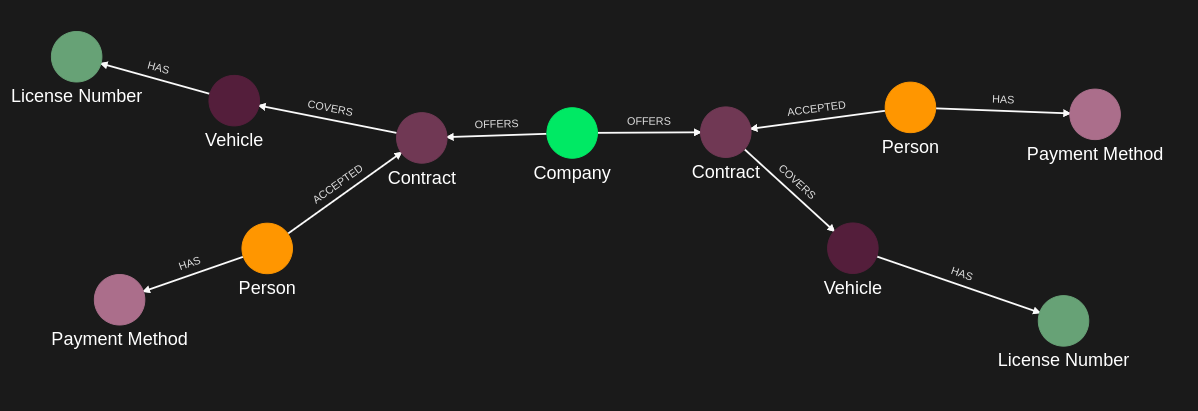
External Data Resolver & Data Reference Flow
Example scenario
A car rental app needs vehicle VIN numbers, but VINs are stored in a separate vehicle registry:
- IKG stores: Person(Alice) -[ACCEPTED]-> Contract -[COVERS]-> Vehicle(car2) with category="Car"
- External registry stores: car2.vin = "1HGBH41JXMN109186"
Query execution:
- User (Alice) requests vehicle details including VIN
- ContX IQ policy authorizes: Alice can READ vehicles covered by her contracts
- Query fetches category from IKG: "Car"
- Query detects data reference (
external_value) on vin property - Resolver calls external API to fetch VIN
- Response:
{category: "Car", vin: "1HGBH41JXMN109186"}
What credentials do I need?
- Creating resolvers: Service Account credentials (Config API)
- Ingesting nodes with data references: AppAgent credentials (Capture API)
- Executing queries: AppAgent credentials + optional user access token
Configuration methods:
- Terraform: indykite_external_data_resolver resource
- REST API: Config API documentation
External Data Resolver Configuration
REST API Endpoints
| Operation | Method | Endpoint |
| Create | POST | /configs/v1/external-data-resolvers |
| Read by ID | GET | /configs/v1/external-data-resolvers/{id} |
| Read by name | GET | /configs/v1/external-data-resolvers/{name}?location={project_id} |
| List all | GET | /configs/v1/external-data-resolvers?project_id={id} |
| Update | PUT | /configs/v1/external-data-resolvers/{id} |
| Delete | DELETE | /configs/v1/external-data-resolvers/{id} |
Create Request Syntax
{
  "project_id": "<string>",
  "name": "<string>",
  "display_name": "<string>",
  "description": "<string>",
  "url": "<string>",
  "method": "<string>",
  "headers": {
    "<header_name>": ["<value1>", "<value2>"]
  },
  "request_content_type": "<string>",
  "request_payload": "<string>",
  "response_content_type": "<string>",
  "response_selector": "<string>"
}
What does each field mean?
Required fields
project_id: The GID of the project where the resolver will be created.name: Unique, immutable identifier for the resolver. Used in data references (external_value).url: The full endpoint URL to invoke. Supports parameter substitution (see below).method: HTTP method. Supported values:GET,POST,PUT,PATCH.request_content_type: Content type for requests. Currently onlyJSONis supported.response_content_type: Content type for responses. Currently onlyJSONis supported.response_selector: JSON path to extract data from the response (e.g.,.data,.result.value).
Optional fields
display_name: Human-readable name (can be updated).description: Description of the resolver (max 65000 UTF-8 bytes).headers: HTTP headers to include in requests. Each header can have multiple values.request_payload: JSON body for POST/PUT/PATCH requests (as a string).
URL Parameter Substitution
The URL can include dynamic parameters using the {$...} syntax:
{
  "url": "https://api.example.com/vehicles/{$vehicle.external_id}/vin?format={$format || json}"
}{$vehicle.external_id}: Substituted with the node's external_id at runtime.{$format || json}: Uses "json" as default if format parameter is not provided.
Response Selector
The response_selector uses jq-like JSON path syntax to extract values:
| Selector | API Response | Extracted Value |
.vin |
{"vin": "ABC123"} |
"ABC123" |
.data.value |
{"data": {"value": "XYZ"}} |
"XYZ" |
.results[0] |
{"results": ["first", "second"]} |
"first" |
.echo |
{"echo": {"nested": "data"}} |
{"nested": "data"} |
Example: Create External Data Resolver
{
  "project_id": "gid:AAAABbbbCCCC...",
  "name": "vin-lookup-resolver",
  "display_name": "Vehicle VIN Lookup",
  "description": "Fetches vehicle VIN from external registry",
  "url": "https://vehicle-registry.example.com/api/v1/vehicles/{$vehicle_id}",
  "method": "GET",
  "headers": {
    "Authorization": ["Bearer api-key-12345"],
    "X-API-Version": ["2024-01"]
  },
  "request_content_type": "JSON",
  "response_content_type": "JSON",
  "response_selector": ".data.vin"
}
Example: POST Request with Payload
{
  "project_id": "gid:AAAABbbbCCCC...",
  "name": "enrichment-service",
  "display_name": "Data Enrichment Service",
  "description": "Enriches node data via POST request",
  "url": "https://enrichment.example.com/api/enrich",
  "method": "POST",
  "headers": {
    "Authorization": ["Bearer secret-token"]
  },
  "request_content_type": "JSON",
  "request_payload": "{\"lookup_type\": \"vehicle\", \"fields\": [\"vin\", \"registration\"]}",
  "response_content_type": "JSON",
  "response_selector": ".enriched_data"
}
Using external_value (Data References) in Nodes
What is external_value?
A data reference is created when you use external_value instead of value for a property. The external_value points to an External Data Resolver, which fetches the actual value from an external system when queried via ContX IQ.
How can I reference a resolver?
The external_value accepts multiple reference formats:
| Format | Example | Description |
| By name | "external_value": "vin-lookup-resolver" |
Reference resolver by its unique name |
| By GID | "external_value": "gid:AAAABbbbCCCC..." |
Reference resolver by its configuration ID |
| Parameter | "external_value": "$resolver_ref" |
Dynamic reference via input parameter (in Knowledge Query upserts) |
Node with external_value Syntax
Using resolver name (string):
{
  "external_id": "car2",
  "type": "Vehicle",
  "properties": [
    {
      "type": "category",
      "value": "Car"
    },
    {
      "type": "vin",
      "external_value": "vin-lookup-resolver"
    }
  ]
}
Using resolver GID:
{
  "external_id": "car2",
  "type": "Vehicle",
  "properties": [
    {
      "type": "category",
      "value": "Car"
    },
    {
      "type": "vin",
      "external_value": "gid:AAAABWtpcmtlby1jb25maWcAACRleHRlcm5hbC1kYXRhLXJlc29sdmVyL..."
    }
  ]
}
In these examples:
categoryhas a regularvaluestored in the IKG.vinusesexternal_valuepointing to the resolver (by name or GID).
Capture API Request
POST /capture/v1/nodes
{
  "nodes": [
    {
      "external_id": "alice",
      "is_identity": true,
      "type": "Person",
      "properties": [
        {
          "type": "email",
          "value": "alice@email.com"
        },
        {
          "type": "given_name",
          "value": "Alice"
        }
      ]
    },
    {
      "external_id": "car2",
      "type": "Vehicle",
      "properties": [
        {
          "type": "category",
          "value": "Car"
        },
        {
          "type": "is_active",
          "value": true
        },
        {
          "type": "vin",
          "external_value": "vin-lookup-resolver"
        }
      ]
    }
  ]
}
ContX IQ Integration
Policy for External Data Access
The CIQ policy defines the graph pattern and what can be read. External data properties are accessed through the same allowed_reads as regular properties.
{
  "meta": {
    "policy_version": "1.0-ciq"
  },
  "subject": {
    "type": "Person"
  },
  "condition": {
    "cypher": "MATCH (company:Company)-[:OFFERS]->(contract:Contract)<-[:ACCEPTED]-(subject:Person), (contract)-[:COVERS]->(vehicle:Vehicle)",
    "filter": [
      {
        "attribute": "subject.external_id",
        "operator": "=",
        "value": "$subject_external_id"
      }
    ]
  },
  "allowed_reads": {
    "nodes": [
      "vehicle",
      "vehicle.*"
    ]
  }
}
The vehicle.* wildcard allows reading all vehicle properties, including data references (properties with external_value).
Knowledge Query Requesting External Data
The knowledge query specifies which properties to return. External value properties are requested the same way as regular properties:
{
  "nodes": [
    "vehicle",
    "vehicle.property.category",
    "vehicle.property.vin"
  ]
}
When executed:
vehicle.property.category: Returns value from IKG ("Car")vehicle.property.vin: Triggers resolver call, returns external value ("vinmagic")
Execution and Response
Execute the query via ContX IQ:
POST /contx-iq/v1/execute
{
  "id": "knowledge_query_gid",
  "input_params": {
    "subject_external_id": "alice"
  }
}
Response with combined IKG + external data:
{
  "data": [
    {
      "nodes": {
        "vehicle": {
          "Labels": ["Resource", "Vehicle"],
          "Props": {
            "external_id": "car2",
            "type": "Vehicle"
          }
        },
        "vehicle.property.category": "Car",
        "vehicle.property.vin": "vinmagic"
      }
    }
  ]
}
Terraform Configuration
Use the indykite_external_data_resolver resource:
resource "indykite_external_data_resolver" "vin_lookup" {
  location          = indykite_application_space.my_app_space.id
  name              = "vin-lookup-resolver"
  display_name      = "Vehicle VIN Lookup"
  description       = "Fetches vehicle VIN from external registry"
  url               = "https://vehicle-registry.example.com/api/v1/vehicles"
  method            = "GET"
  request_type      = "json"
  response_type     = "json"
  response_selector = ".data.vin"
headers {
name   = “Authorization”
values = [“Bearer ${var.api_key}”]
}
headers {
name   = “X-API-Version”
values = [“2024-01”]
}
}
Terraform Arguments Reference
| Argument | Required | Description |
location |
Yes | Application Space ID where the resolver is created |
name |
Yes | Unique, immutable identifier |
url |
Yes | External API endpoint URL |
method |
Yes | HTTP method (GET, POST, PUT, PATCH) |
request_type |
Yes | Request content type (json) |
response_type |
Yes | Response content type (json) |
response_selector |
Yes | JSON path to extract value |
display_name |
No | Human-readable name |
description |
No | Resource description |
headers |
No | Request headers block |
request_payload |
No | JSON body for POST/PUT/PATCH |
Error Handling
| HTTP Code | Meaning | Common Cause |
| 400 | Bad Request | Invalid JSON, missing required fields |
| 401 | Unauthorized | Invalid or missing Bearer token |
| 403 | Forbidden | Insufficient permissions for the project |
| 404 | Not Found | Resolver ID/name doesn't exist |
| 412 | Precondition Failed | ETag mismatch (concurrent modification) |
| 422 | Unprocessable Entity | Validation error (invalid URL, method, etc.) |
Best Practices
Security
- Store API keys and tokens securely; use environment variables in Terraform.
- Use HTTPS endpoints only for external APIs.
- Implement proper authentication on your external endpoints.
Performance
- External resolver calls add latency to queries. Use sparingly for truly external data.
- Consider caching on your external API if data doesn't change frequently.
- Keep response payloads small; use
response_selectorto extract only needed data.
Design
- Use descriptive resolver names that indicate the data source.
- One resolver per data type/source for better maintainability.
- Document the expected response format for each resolver.
Complete Example
See the full working example at: ContX IQ: Query External Data Sources via Data Resolver
Next Steps
- ContX IQ guide: ContX IQ Guide
- Terraform provider: External Data Resolver Resource
- REST API reference: Config API
- Credentials guide: Credentials Guide