
KBAC: List the Active Authorization Policies of a Project with GET /access/v1/policies
This example demonstrates the policy listing endpoint of the AuthZEN REST API.
Endpoint: GET /access/v1/policies
Header: X-IK-ClientKey with an AppAgent credential whose agent holds the ReadAuthZConfigs API permission. No user token is involved.
Query parameter:
- subject_type (optional): keep only the policies whose subject.type equals this node type (2-64 characters, a valid node label). Omitted: every policy is returned. A subject type no policy uses is not an error - the result list is simply empty.
Response:
- results[]: one entry per policy.
- results[].policy: the policy definition as it was stored - the policy string sent to POST /configs/v1/authorization-policies, parsed into a JSON object. meta, subject, actions, resource, and condition (with an optional filter) appear exactly as authored.
- results[].tags: the policy's tags, the values matched by context.policy_tags on evaluation. Always an array, [] when the policy has none.
What is listed:
- KBAC policies (2.0-kbac and 3.0-kbac) with status ACTIVE - the same set the decision endpoints evaluate. Inactive policies are not returned.
- Only the project of the calling agent. Policy IDs, names, and timestamps are not part of the response; use the Config API for management.
- ContX IQ policies (1.0-ciq) are not included.
Permissions:
- ReadAuthZConfigs gates this endpoint and nothing else. It is separate from Authorization: an agent with Authorization alone gets 401 "insufficient API access level for appAgent" here, and an agent with ReadAuthZConfigs alone can read the rules but not evaluate them.
- ReadAuthZConfigs replaces the retired IKGRead value in the api_permissions list. It is not granted to existing agents automatically - add it explicitly. A request that still sends IKGRead is accepted and the value is silently dropped.
Use case
Scenario: An admin console renders "which rules apply to people right now?" and a client picks policy_tags for its evaluations from the tags that actually exist, without shipping Service Account credentials to either of them.
Policies in the project:
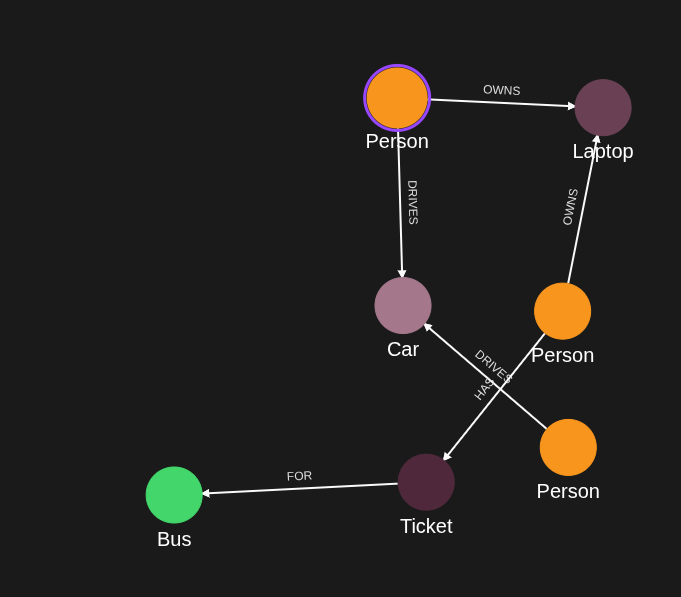
- Person CAN_DRIVE a Car when a DRIVES relationship exists (no tags).
- Person CAN_RIDE a Bus when they hold a Ticket FOR it (no tags).
- _Application CAN_READ any Car (tag "fleet").
Three calls:
1. GET /access/v1/policies -> all three policies, each with its inlined definition and tags.
2. GET /access/v1/policies?subject_type=Person -> the two Person policies.
3. GET /access/v1/policies?subject_type=Robot -> {"results": []}.
An agent that holds only the Authorization permission is refused with 401 on every one of them.
Requirements
Prerequisites:
- ServiceAccount credentials: For creating the policies and the application agent.
- AppAgent credentials: For calling /access/v1/policies (X-IK-ClientKey). The agent must hold ReadAuthZConfigs.
- At least one ACTIVE KBAC policy in the project.
Required API access:
- POST /configs/v1/authorization-policies
- POST /configs/v1/application-agents (or PUT /configs/v1/application-agents/{id} to add the permission to an existing agent)
- GET /access/v1/policies
Steps
Step 1: Create the Policies
- Authentication: ServiceAccount credential.
- Action: POST three KBAC policies - CAN_DRIVE and CAN_RIDE for Person, CAN_READ for _Application with the tag "fleet".
- Result: Three ACTIVE policies in the project.
Step 2: Grant ReadAuthZConfigs to the Agent
- Authentication: ServiceAccount credential.
- Action: Create the application agent with ReadAuthZConfigs in api_permissions (or PUT the permission onto an existing agent), then generate its credential.
- Result: An AppAgent credential allowed to list policies.
Step 3: List Every Active Policy
- Authentication: AppAgent credential (X-IK-ClientKey).
- Action: GET /access/v1/policies.
- Result: results[] with three entries; each policy is a JSON object, each tags an array.
Step 4: Filter by Subject Type
- Action: GET /access/v1/policies?subject_type=Person.
- Result: Only the two Person policies.
Step 5: Filter by an Unused Subject Type
- Action: GET /access/v1/policies?subject_type=Robot.
- Result: 200 with an empty results array.
Step 1
CAN_DRIVE policy for Person subjects (Person -[DRIVES]-> Car).
{
  "meta": {
    "policy_version": "2.0-kbac"
  },
  "subject": {
    "type": "Person"
  },
  "actions": [
    "CAN_DRIVE"
  ],
  "resource": {
    "type": "Car"
  },
  "condition": {
    "cypher": "MATCH (subject:Person)-[:DRIVES]->(resource:Car)"
  }
}
Request to create the CAN_DRIVE policy. The policy field is the stringified policy; the listing endpoint later returns it parsed back into an object.
{
  "project_id": "your_project_gid",
  "description": "description of policy",
  "display_name": "policy name",
  "name": "policy-name",
  "policy": "{\"meta\":{\"policy_version\":\"2.0-kbac\"},\"subject\":{\"type\":\"Person\"},\"actions\":[\"CAN_DRIVE\"],\"resource\":{\"type\":\"Car\"},\"condition\":{\"cypher\":\"MATCH (subject:Person)-[:DRIVES]->(resource:Car)\"}}",
  "status": "ACTIVE",
  "tags": []
}
CAN_RIDE policy for Person subjects (Person -HAS-> Ticket -FOR-> Bus).
{
  "meta": {
    "policy_version": "2.0-kbac"
  },
  "subject": {
    "type": "Person"
  },
  "actions": [
    "CAN_RIDE"
  ],
  "resource": {
    "type": "Bus"
  },
  "condition": {
    "cypher": "MATCH (subject)-[:HAS]->(ticket:Ticket)-[:FOR]->(resource)"
  }
}
Request to create the CAN_RIDE policy.
{
  "project_id": "your_project_gid",
  "description": "description of policy",
  "display_name": "policy name",
  "name": "policy-name",
  "policy": "{\"meta\":{\"policy_version\":\"2.0-kbac\"},\"subject\":{\"type\":\"Person\"},\"actions\":[\"CAN_RIDE\"],\"resource\":{\"type\":\"Bus\"},\"condition\":{\"cypher\":\"MATCH (subject)-[:HAS]->(ticket:Ticket)-[:FOR]->(resource)\"}}",
  "status": "ACTIVE",
  "tags": []
}
CAN_READ policy for _Application subjects: any application of the project may read any Car.
{
  "meta": {
    "policy_version": "2.0-kbac"
  },
  "subject": {
    "type": "_Application"
  },
  "actions": [
    "CAN_READ"
  ],
  "resource": {
    "type": "Car"
  },
  "condition": {
    "cypher": "MATCH (subject) MATCH (resource:Car)"
  }
}
Request to create the CAN_READ policy, tagged "fleet". The tag is what the listing returns under tags and what context.policy_tags selects on evaluation.
{
  "project_id": "your_project_gid",
  "description": "Any application of the project can read every car",
  "display_name": "application can read a car",
  "name": "application-can-read-a-car",
  "policy": "{\"meta\":{\"policy_version\":\"2.0-kbac\"},\"subject\":{\"type\":\"_Application\"},\"actions\":[\"CAN_READ\"],\"resource\":{\"type\":\"Car\"},\"condition\":{\"cypher\":\"MATCH (subject) MATCH (resource:Car)\"}}",
  "status": "ACTIVE",
  "tags": [
    "fleet"
  ]
}
Step 2
Application agent that can both decide (Authorization) and read the rules (ReadAuthZConfigs). To add the permission to an existing agent, PUT the full api_permissions list to /configs/v1/application-agents/{id}.
{
  "api_permissions": [
    "Authorization",
    "ReadAuthZConfigs"
  ],
  "application_id": "gid-of-application",
  "description": "Makes AuthZEN decisions and can read the project's active policies",
  "display_name": "Policy-aware agent",
  "name": "policy-aware-agent"
}
Step 3
GET with X-IK-ClientKey only. Every ACTIVE KBAC policy of the agent's project comes back as stored, with its tags. Response shown.
{
  "results": [
    {
      "policy": {
        "meta": {
          "policy_version": "2.0-kbac"
        },
        "subject": {
          "type": "Person"
        },
        "actions": [
          "CAN_DRIVE"
        ],
        "resource": {
          "type": "Car"
        },
        "condition": {
          "cypher": "MATCH (subject:Person)-[:DRIVES]->(resource:Car)"
        }
      },
      "tags": []
    },
    {
      "policy": {
        "meta": {
          "policy_version": "2.0-kbac"
        },
        "subject": {
          "type": "Person"
        },
        "actions": [
          "CAN_RIDE"
        ],
        "resource": {
          "type": "Bus"
        },
        "condition": {
          "cypher": "MATCH (subject)-[:HAS]->(ticket:Ticket)-[:FOR]->(resource)"
        }
      },
      "tags": []
    },
    {
      "policy": {
        "meta": {
          "policy_version": "2.0-kbac"
        },
        "subject": {
          "type": "_Application"
        },
        "actions": [
          "CAN_READ"
        ],
        "resource": {
          "type": "Car"
        },
        "condition": {
          "cypher": "MATCH (subject) MATCH (resource:Car)"
        }
      },
      "tags": [
        "fleet"
      ]
    }
  ]
}
Both calls in Python: the full listing, then the Person-only listing.
import http.client
import json
import urllib.parse

conn = http.client.HTTPSConnection("eu.api.indykite.com")

headers = {
    'X-IK-ClientKey': ""
}

# All active KBAC policies of the agent's project
conn.request("GET", "/access/v1/policies", headers=headers)
res = conn.getresponse()
policies = json.loads(res.read())["results"]

# Only the policies written for Person subjects
query = urllib.parse.urlencode({"subject_type": "Person"})
conn.request("GET", "/access/v1/policies?" + query, headers=headers)
res = conn.getresponse()
person_policies = json.loads(res.read())["results"]

for entry in person_policies:
    policy = entry["policy"]          # the policy JSON exactly as it was stored
    print(policy["subject"]["type"], policy["actions"], policy["resource"]["type"], entry["tags"])
Step 4
subject_type=Person keeps only the policies written for Person subjects; the _Application policy is left out. Response shown.
{
  "results": [
    {
      "policy": {
        "meta": {
          "policy_version": "2.0-kbac"
        },
        "subject": {
          "type": "Person"
        },
        "actions": [
          "CAN_DRIVE"
        ],
        "resource": {
          "type": "Car"
        },
        "condition": {
          "cypher": "MATCH (subject:Person)-[:DRIVES]->(resource:Car)"
        }
      },
      "tags": []
    },
    {
      "policy": {
        "meta": {
          "policy_version": "2.0-kbac"
        },
        "subject": {
          "type": "Person"
        },
        "actions": [
          "CAN_RIDE"
        ],
        "resource": {
          "type": "Bus"
        },
        "condition": {
          "cypher": "MATCH (subject)-[:HAS]->(ticket:Ticket)-[:FOR]->(resource)"
        }
      },
      "tags": []
    }
  ]
}
Step 5
A subject type no policy uses matches nothing: status 200 with an empty results array, not an error.
{
  "results": []
}
The same call from an agent that holds Authorization but not ReadAuthZConfigs.
{
  "message": "insufficient API access level for appAgent"
}API Endpoints
/configs/v1/authorization-policies/configs/v1/application-agents/access/v1/policies